Anuja W. logo Anuja
Available for work

I see possibilities. Then I design them

About me

Hello ! I’m Anuja 👋

UI/UX Designer and Product Designer

I’m a Senior Designer with over 8 years of experience in UX/UI design, front-end development, and product strategy. I’m passionate about creating seamless digital experiences that balance aesthetics, functionality, business goals, and real user needs.

I use AI tools strategically throughout the design process—from research synthesis, content creation, ideation, and rapid prototyping to image, icon, and interface generation. I understand when AI can accelerate the workflow and when human judgment, creativity, empathy, and validation are essential.

Based in Singapore  |  Available for collaborations & creative challenges
More about me
8+
Years of Experience Designing Impactful Digital Products

Human-led

User research Research synthesis UX strategy Information architecture User flow design Wireframing Interface design Rapid prototyping Usability testing Design systems

AI-accelerated

AI-assisted design Prompt engineering AI prototyping & rapid iteration
Selected work

See How I Solve Problems and Turn Ideas into Impact

Explore selected projects across different industries and user groups—each shaped by a unique challenge, thoughtful approach, and purposeful solution.

By the numbers

Experience in Numbers

Turning ideas into thoughtful digital experiences—one product, website and interaction at a time.

8+ Years of Experience

40+ Websites Built

20+ Digital Products Designed

5 Companies Worked With

Working together

What the people I build with say.

I have managed Anuja since he joined AI Singapore in 2023. He started with us primarily as a UI/UX designer, but has since grown into what I once described as a Designer-Developer dual threat: someone who can not only design a good user experience, but also implement his own designs…
Mun-Thye Mak Senior AI Engineer
I worked with Anuja on two projects — a Cybersecurity Prize Challenge Platform and the International Olympiad in Artificial Intelligence Contest Platform — and he consistently delivered strong UI/UX work throughout. He designs complete user flows from scratch in Figma, with a clear sense of the direction he wants…
Lim Qun Full-stack Developer
You are a very talented technical resource with multiple skills under your expertise, from UI designing to coding. It was a pleasure working with you at Mubasher Trade and seeing your contribution on the MT Plus product range going up to 2nd generation platforms. Your skills on team building and the fun club are also appreciated.
Arjuna Nanayakkara CEO of GTN Tech (Pvt) Ltd
Anuja is a talented and workaholic youngster, who possesses great web designing skills, and I have worked with him closely as fellow team members. He’s a person who is capable of grabbing what he has been assigned into depth and completes his work on time. He’s one of the smartest UI designers in our company, as he guided the interns quite well…
Yashoda Liyanage Business Analyst
An amazing guy with the latest knowledge in all the front-end developments, with his past experience and day-to-day updates with technologies. Has the ability to work with team spirit and correct deadlines. Has an outgoing personality.
Ruwan Prabash Front-end Engineer

Read more recommendations on LinkedIn

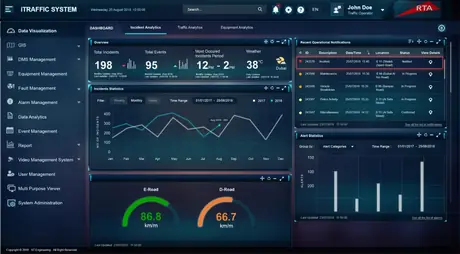
Illustration: a figure looking up at a night sky filled with screens from these
              projects — a journey map, a traffic dashboard, a trading board and an
              investor profile.

I see possibilities. Then I design them.

Years of looking up at problems other people had stopped looking at — and building the thing that answers them.

Back to site Career

Experience

Eight years across trading platforms, government systems, e-commerce and AI-powered education — in Singapore and Sri Lanka. Each role added a different constraint to design around.

8+Years of experience
5Companies worked with
2Countries
Present
Apr 2023 – Present
Current

AI Singapore under NUS Singapore

UI/UX Designer with Frontend

Roles & Responsibilities

  • Led end-to-end UI/UX designs for a primary grade educational platform, a Data Ingestion & Reconstruction Web App, and revamped a prize challenge portal.
  • Conducted in-depth user research to identify key user groups and developed detailed user journeys, personas, and flows, ensuring designs were aligned with real user needs.
  • Created low-fidelity prototypes and iterated to high-fidelity designs, collaborating closely with product managers to incorporate feedback and refine user experience.
  • Utilised user behaviour analytics (Hotjar, Google Analytics) to track engagement and identify user pain points.

Projects

Mother tongue language app for students (with MOE) Prize challenge web app Visual translational project with Singapore Land Authority
2022
Mar 2020 – Oct 2022

CapBridge Pte. Ltd. Singapore

UI/UX Designer

Roles & Responsibilities

  • Create user stories, user flows, wireframes, low fidelity/high fidelity mockups, UI iterations, and prototypes in Adobe XD.
  • Improve existing components and build new components to optimize a style guide.
  • Collaborate with stakeholders to translate business goals into delightful product experiences.
  • Manage and led the design tasks for both web and mobile CapBridge app.
  • Work on improvements to the visuals and UX of the overall product with the development teams.

Projects

CapBridge Investment Mobile and Web App 1Exchange trading responsive Web App Company CMS websites (WordPress)
2020
Mar 2019 – Mar 2020

ST Engineering Singapore

UI/UX Designer

Roles & Responsibilities

  • Implementing, maintaining, and evolving client’s product design using well-defined design strategies.
  • Utilize best practices to execute competitive analysis, heuristic evaluations, wireframes, and UI designs for user-centered products.
  • Follow the UX research and create interaction designs for the iTraffic web application.
  • Translate requirements and complex data sets into concepts and user experience designs.
  • Provide value by validating proof of concepts through interactive design prototypes.

Projects

iTraffic (Traffic management web application)
2019
Sep 2017 – Mar 2019

Stationery World Singapore

UI Designer

Roles & Responsibilities

  • Work closely with Project managers to create concept and design wireframes.
  • Communicating our customer understanding by creating personas and customer journeys.
  • Create wireframes, and prototypes for Web, and Mobile versions to align with the latest design trends.
  • Translate requirements and complex data sets into concepts and user experience designs.
  • Convert designs to rich HTML5 version using HTML5, CSS3.

Projects

Stationery World responsive E-commerce website Singapore American School stationery web application
2017
May Aug – Sept 2017

MubasherTrade Sri Lanka

UI Engineer

Roles & Responsibilities

  • Follow the user experience strategy for large and small applications including user research, information architecture, and UI/UX design while collaborating with programmers.
  • Followed the User Centered Design process.
  • Stay on top of contemporary UI/UX design concepts and patterns.
  • Work closely with the Business team and Software architects to create concept and design wireframes.
  • Create wireframes, and prototypes for Web, Mobile, and Tablet versions that align with the latest design trends.

Projects

MTPlus (Trading application including Android, iOS, and Desktop hybrid versions)
See the case studies
Back to site About me

Hello! I’m Anuja 👋

Senior UI/UX Designer & Product Designer

I’m a Senior Designer with over eight years of experience in UX/UI design, front-end development, and product strategy. I’m passionate about creating seamless digital experiences that balance aesthetics, functionality, business goals, and real user needs.

I use AI tools strategically throughout the design process—from research synthesis, content creation, ideation, and rapid prototyping to image, icon, and interface generation. I understand when AI can accelerate the process and when human creativity, empathy, and judgement should lead.

User research Research synthesis UX strategy Information architecture User flow design Wireframing Interface design Rapid prototyping Usability testing Design systems AI-assisted design Prompt engineering AI prototyping & rapid iteration
Anuja sitting cross-legged with a laptop, surrounded by the tools of the trade: Figma, Adobe Creative Cloud, an iPad and stylus, an AI chip, HTML, CSS and JavaScript badges, a wireframing notebook, headphones, UX books and a lightbulb.
8+Years of experience
Off duty

What I do when I’m not working

Love, live, laugh, travel, and train—that’s my current life mantra.

When I’m away from the screen, you’ll usually find me at the gym, travelling with the people I love, playing cricket, or discovering new food and experiences. I’m passionate about maintaining a healthy and balanced lifestyle.

Over the past year, I transformed my lifestyle and lost 32 kg through consistency, discipline, and healthier habits. Surprising, right? 😊💪🏻

Gym and fitness

Training is the part of the day that is entirely mine.

Travel

Going somewhere new with the people I love.

Cricket

Still the fastest way to lose a whole afternoon.

Food and new experiences

Hunting down something I have never eaten before.

A glimpse into my life
Say hello

Let’s connect!

Want to stay up to date with my work and what I’m creating? Follow me on social media.

Back to home
Selected work

Five projects, and the thinking behind them.

Education, finance, city infrastructure, hospitality and retail. Different industries, different users, the same job each time: work out what the product is really trying to change, then design the shortest honest path to it.

Exercise introduction with the illustrated scene
UI/UX · EdTech2023–2025

AI-Powered Mother Tongue Learning

An AI speaking-practice platform for Primary 1 and 2 students in Singapore, built with the Ministry of Education. Four connected user groups — students, teachers, school administrators and system owners — around one student-first MVP, then improved against behavioural evidence from more than 500 observed sessions.

Tools
Figma Adobe XD Hotjar Google Analytics Service blueprinting Proto-personas
Technologies
Web application LLM conversation Speech recognition Design system
Read the case study
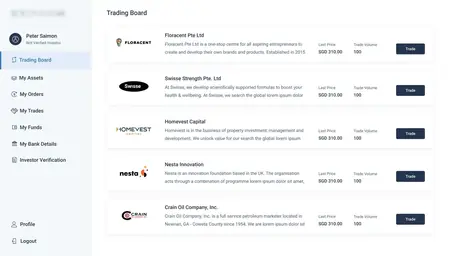
1Exchange trading board
UI/UX · Fintech2020–2022

1Exchange — Investment Platform

A regulated private-securities exchange, designed for people making consequential decisions with money. Dense trading boards, order history and company disclosures, held together by a style guide that let a small team ship consistently across web and mobile.

Tools
Adobe XD Figma Style guide Journey mapping Prototyping
Technologies
Responsive web app Mobile app Component library WordPress CMS
Read the case study
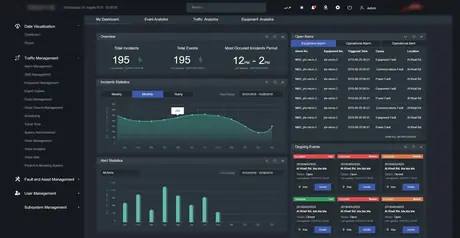
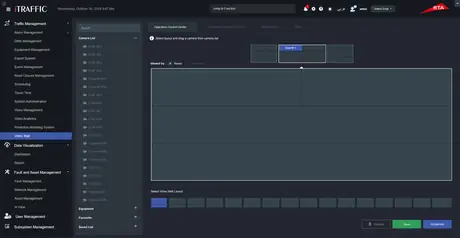
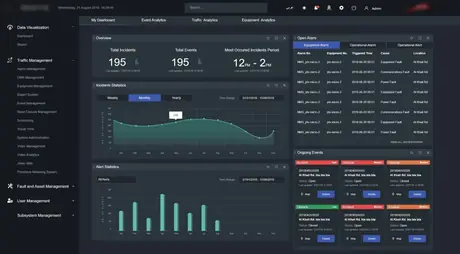
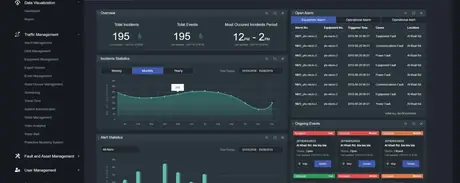
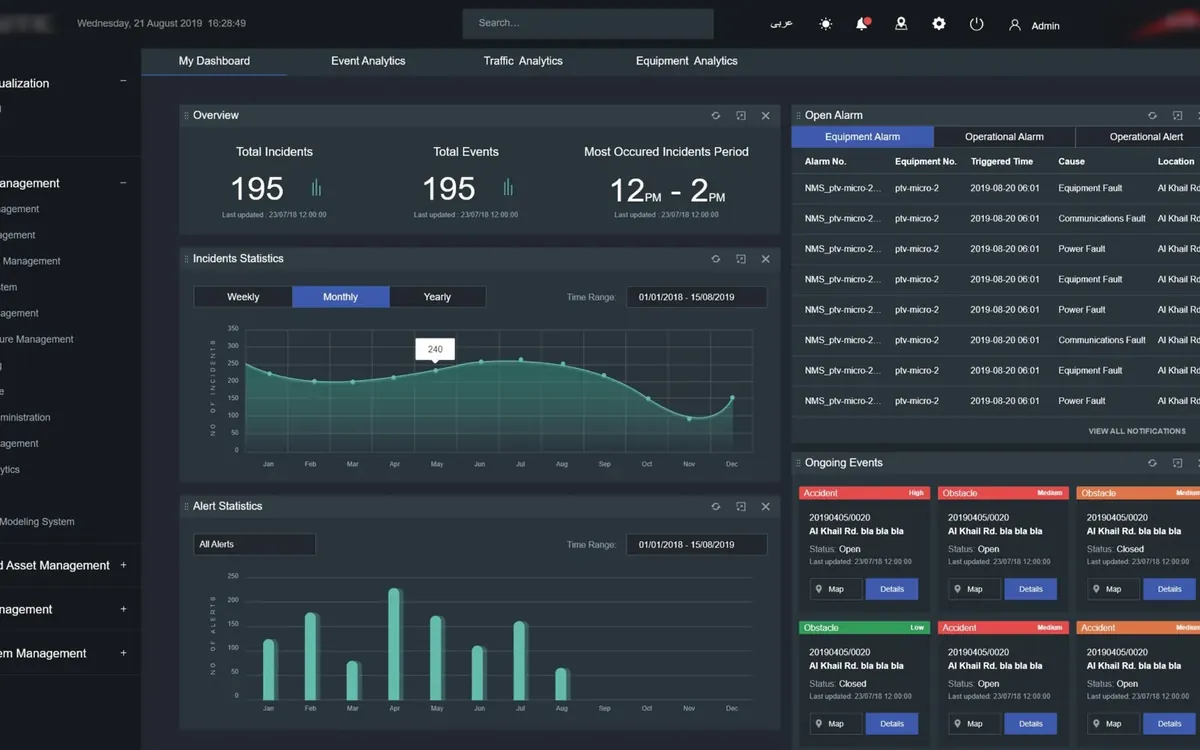
iTraffic operations dashboard
UI/UX · Enterprise2019–2020

iTraffic — Traffic Management

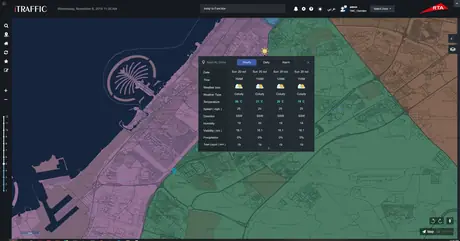
A control-room application for monitoring and managing traffic across a city network. Live maps, incident queues and volume charts designed to stay readable on a wall display at a glance, and precise enough for an operator working a single incident.

Tools
Adobe XD Heuristic evaluation Competitive analysis Interactive prototypes
Technologies
Enterprise web app Live map interface Data visualisation
Read the case study
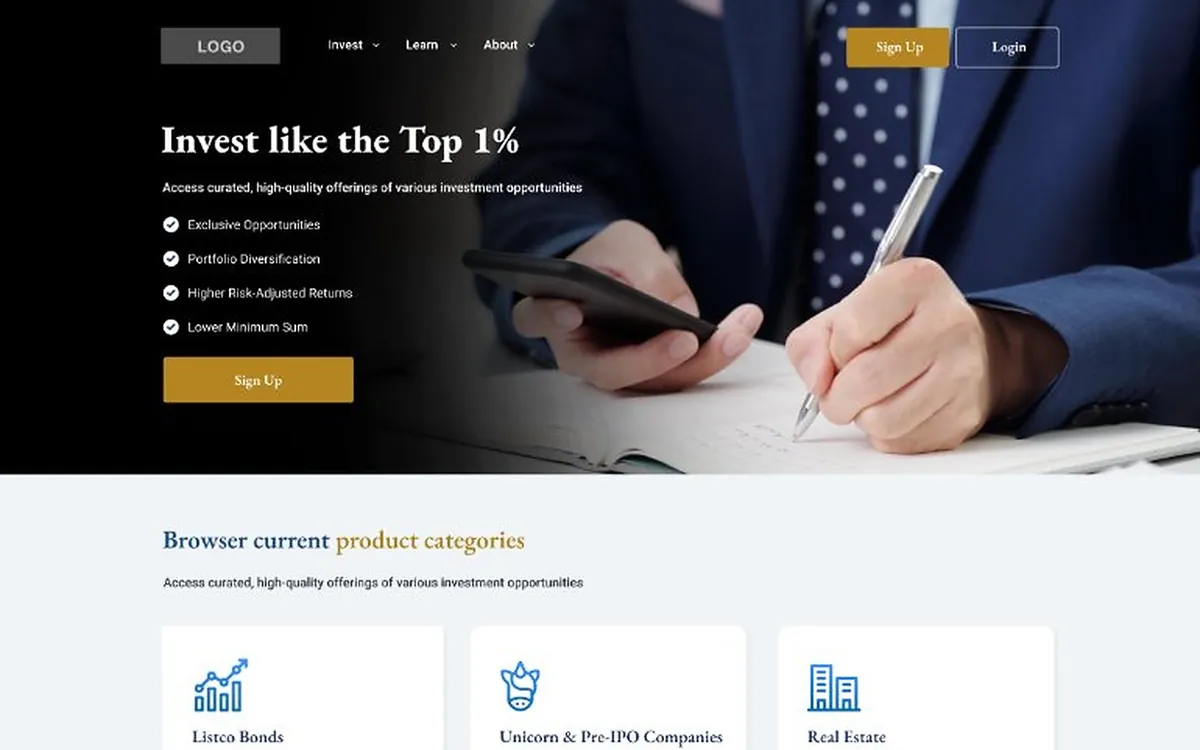
CapBridge landing page
UI/UX · Web DesignOngoing

Website Design & Transformation

How I redesign existing websites and build new ones: a user-centred process from audit to interface, a showcase of shipped web screens, and the performance and search-engine practice that keeps a good design fast and findable.

Tools
Figma Adobe XD Heuristic evaluation Lighthouse Search Console
Technologies
Responsive web design Core Web Vitals Technical SEO Accessibility (WCAG AA)
Read the case study
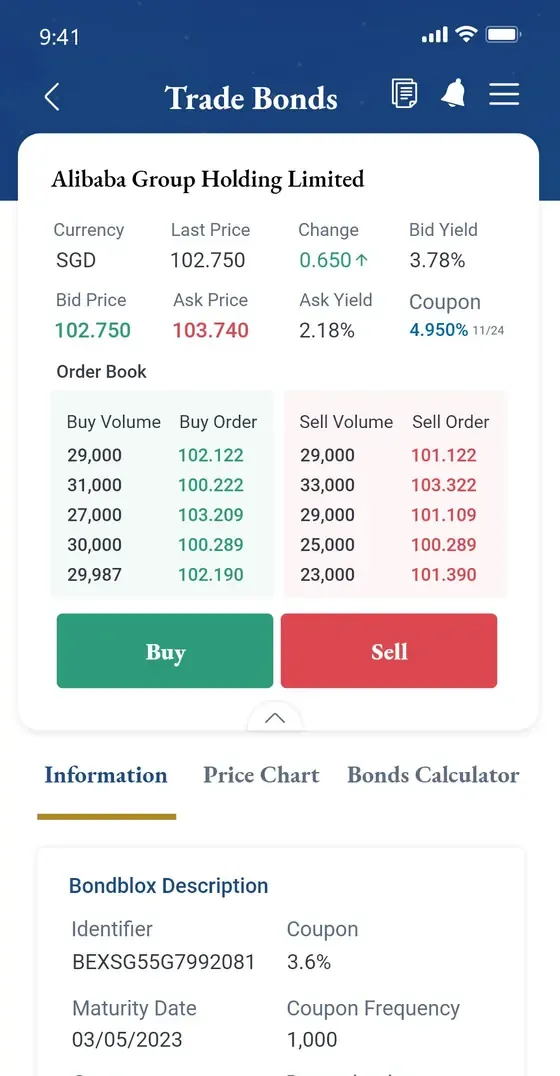
Trade Bonds screen
UI/UX · Fintech2021–2022

CapBridge Investments

A private-markets investment platform for individual investors and wealth managers. I inherited an app built by a third party, evaluated it against Nielsen’s heuristics, and rebuilt the journeys around what the evaluation found — without losing the brand investors already recognised.

Tools
Adobe XD Adobe Photoshop Adobe Illustrator Heuristic evaluation Style guide
Technologies
iOS & Android app Design system Developer handoff
Read the case study
Back to home
Curriculum vitae

Anuja Wijethunga

Senior UI/UX & Product Designer. The one-page version is below — take the PDF if you would rather read it somewhere else.

Download PDF 1.0 MB
Now
UI/UX Designer, AI Singapore
Practising since
2017
Sectors
Education, finance, city infrastructure, retail
Core tools
Figma, Adobe XD, Illustrator, Photoshop
Anuja Wijethunga’s one-page CV
All Work
UI/UX Case Study · EdTech · AI · Singapore

AI-Powered Mother Tongue Learning Experience

Designing an engaging, age-appropriate AI learning experience that helps Primary 1 and Primary 2 students practise speaking their Mother Tongue through guided, picture-based conversations.

RoleUI/UX Designer
UsersStudents, Teachers, School Administrators and System Owners
PartnerSingapore’s Ministry of Education and selected primary schools
TeamProduct Manager, UI/UX Designer, AI Engineer, two Backend Engineers, Frontend Engineer and QA Engineer
01 Project context

From low engagement to confident conversations.

This project was developed in collaboration with Singapore’s Ministry of Education and selected primary schools. It aimed to create more opportunities for young learners to practise speaking their Mother Tongue Language, while giving educators the tools and oversight needed to create, assign and manage suitable learning activities.

The problem

Primary 1 and Primary 2 students may have limited confidence and proficiency when speaking their Mother Tongue Language. Outside the classroom, many students do not receive enough opportunities to practise speaking naturally.

At the same time, teachers cannot always provide every student with frequent, individualised speaking practice and immediate conversational feedback.

Project goal

Create a web application that supports students’ Mother Tongue Language development through repeated, picture-based speaking activities and guided AI conversations.

The experience also needed to provide teachers, school administrators and system owners with the tools required to manage content, users, permissions and learning activities.

The design challenge

How might we create a safe, engaging and age-appropriate AI experience that encourages young students to practise speaking independently, while giving educators confidence that the conversations are relevant, accurate and suitable?

My role

As the UI/UX Designer, I shaped the experience from early discovery to final validation.

  • Understanding the four-user product ecosystem
  • Defining user needs, permissions and workflows
  • Creating proto-personas
  • Mapping states, journeys and service dependencies
  • Developing information architecture and user flows
  • Creating pre-sketch requirement frameworks
  • Designing low-fidelity wireframes
  • Creating two visual experiences for children and adults
  • Producing high-fidelity designs and interactive prototypes
  • Collaborating with the Product Manager, AI team and developers
  • Presenting MVP 1 to MOE stakeholders
  • Supporting school trials
  • Reviewing Hotjar recordings and Google Analytics
  • Identifying student frustration points
  • Converting behavioural findings into MVP 2 improvements
02 The product ecosystem

Four user groups. One connected learning ecosystem.

Before designing individual screens, I needed to understand the people, responsibilities and dependencies within the complete platform. Through initial discussions with the Product Manager, MOE stakeholders, engineers and other relevant parties, I identified four primary user groups.

01

Students

Primary 1 and Primary 2 learners who complete assigned picture-based speaking exercises and interact with the AI.

02

Teachers

Educators who create exercises, upload or select images, define activities, assign exercises and review student participation or output.

03

School Administrators

Users who manage teachers, students, classes and school-level access.

04

System Owners

Platform-level users who create and manage schools, permissions, settings, content governance and system operations.

Teachers create & assign exercises School Administrators manage people & classes Students speak, practise, complete System Owners govern the platform assigns exercises accounts & classes permissions & governance creates and manages teacher accounts sets what each school can do
  1. System Owners create schools, configure permissions and set platform governance — which decides what everyone below can do.
  2. School Administrators create and manage teacher and student accounts and classes within those permissions.
  3. Teachers create exercises and assign them to the classes administrators set up.
  4. Students receive those exercises and do the speaking practice the whole platform exists to support.
Mapping the complete ecosystem helped the team avoid designing four disconnected products. Every administrative action ultimately needed to support the student’s learning experience.
03 Proto-personas

Building informed hypotheses when direct access was limited.

Direct interviews with Primary 1 and Primary 2 students were limited during early discovery because research involving young children requires additional consent, ethical safeguards and age-appropriate communication methods.

Instead of presenting assumptions as confirmed research, I created proto-personas using:

  • Input from MOE stakeholders and educators
  • Discussions with the Product Manager
  • Existing knowledge of the classroom environment
  • Product and curriculum requirements
  • Child-centred interaction principles
  • Expected reading and speaking abilities
  • Known technical and AI constraints
These proto-personas were working hypotheses, not validated personas. They gave the team a shared starting point and were later refined through school trials, observation and behavioural evidence.
StudentsWorking hypothesis
Role and context
Primary 1 or Primary 2 pupil, working through an assigned exercise in a classroom or computer-lab session, usually inside a fixed lesson slot.
Primary goals
Finish the activity the teacher assigned, and feel that the app understood what they said.
Core tasks
Open an assigned exercise, look at the picture, speak in response to the prompts, keep the conversation going, reach the end.
Needs
Instructions that can be followed without much reading; an unmistakable signal for when to speak; a forgiving way to try again.
Frustrations
Not knowing whether the app is listening; being asked to read more than they comfortably can; having no obvious way back after a failed attempt.
Behavioural assumptions
Taps repeatedly when nothing visibly happens; copies what the child at the next machine is doing; disengages quickly from a busy screen.
Digital confidence
Low to moderate. Familiar with tapping and swiping, not with menus, forms or typed input.
Accessibility and usability
Large touch targets, minimal text, audio-led instruction, strong contrast, and no time pressure on a spoken answer.
Questions requiring validation
Do students recognise when to start speaking? What do they actually do after an unrecognised attempt? Does the reward read as motivating or as a distraction?
04 Questions and findings repository

Turning uncertainty into trackable design questions.

Research did not happen only at the beginning of the project. Questions, assumptions and findings were documented and updated continuously as the product evolved.

I maintained a living repository of questions and findings for all four user groups. This helped the team distinguish between:

  • What we already knew
  • What we assumed
  • What needed stakeholder confirmation
  • What required school validation
  • What depended on technical feasibility
  • What was discovered through behavioural evidence
User groupQuestion or assumptionSourceFindingConfidenceDesign implicationStatus
StudentsDo students spend more time reading the converted conversation text than speaking?Hotjar session review, MVP 1Confirmed — reading displaced speaking during the activity.HighRemove converted text from the live conversation; move it to history.Actioned in MVP 2
Product / AIAre Tamil AI conversations accurate and suitable?Session review, MVP 1Confirmed — several conversations contained inaccurate or unsuitable responses.HighDocument the patterns; feed examples to the AI team for further training.Actioned in MVP 2
Product / AIDo Malay and Chinese conversations stay in the selected language?Session review, MVP 1Confirmed — some responses were returned in English.HighImprove language controls and validation; define fallback behaviour in the UI.Actioned in MVP 2
StudentsDo students understand when to start speaking?Hotjar session review, MVP 1Partly — most reached the mic, but many first tapped every icon in the instruction modal, which had no clear way to continue.MediumAdd an “OK, got it” button and make the mic the one obvious next action.Recommended
StudentsWhat does a student do when the AI does not respond to an attempt?Hotjar session review, MVP 1Taps repeatedly, refreshes, or goes back home — seen in 60 sessions where the next prompt never arrived.HighA visible waiting state, a timeout, and a single clear “Try again”.Recommended
TeachersHow much review does a teacher want before approving generated content?Stakeholder discussionEnough to check the picture’s descriptors and the opening prompts; not a full script.MediumReview sits inside Create exercise, before Assign, rather than as a separate task.Built into the flow
TeachersWhat does “progress” mean to a teacher — completion, attempts, or quality?Stakeholder discussionCompletion first, with the option to open a student’s conversation to judge quality.MediumExercise details show who has finished; each student links to their conversation.Built into the flow
School AdministratorsIs class assignment done individually or imported in bulk?Product requirementBoth — classes are set up in bulk from a spreadsheet at the start of the year; students are moved individually.MediumBulk upload with a preview step, plus a select-and-confirm Assign flow.Built into the flow
System OwnersWhich governance controls does MOE require?MOE stakeholdersSchools are created and disabled centrally; each school manages only its own teachers and students.MediumSystem owners manage organisations and admin accounts; admins never see other schools.Built into the flow
Content and safetyWhat happens when generated content is unsuitable and a teacher does not catch it?Hotjar session review, MVP 1It reaches the student: replies mixing Tamil with Japanese (3 sessions), Chinese with English (6), and repeated characters.HighValidate language and output before display; show a safe fallback instead.Recommended
TechnicalWhat happens when an exercise is interrupted part-way?Hotjar session review, MVP 1Leaving or refreshing marks the exercise Incomplete; the student has to reopen it from Home.MediumResume from the last completed turn rather than restarting the conversation.Recommended
Keeping questions and findings visible throughout the project reduced the risk of quietly treating assumptions as facts.
05 User flows and pre-sketch requirements

Defining the experience before drawing the interface.

With four roles depending on each other, I mapped each one’s path through its own task first — what it depends on, and what happens when things go wrong — then turned every step into a requirement before drawing a screen.

The four user flows

Assigned exerciseOpen exerciseView picture and instructionsBegin speakingAI interprets speechAI respondsConversation continuesExercise completesProgress and encouragement

Key screens

  • Assigned exercise list
  • Exercise introduction with picture and prompt
  • Live conversation with listening and speaking states
  • Completion and encouragement

Important decisions

  • Whether the student is ready to start, or wants the instruction again
  • Whether to continue the conversation or end the exercise
  • Whether a spoken attempt was understood well enough to respond to

Depends on other roles

  • The exercise, picture and activity definition supplied by a teacher
  • The class and account created by a school administrator
  • Speech recognition and the language model

Error and recovery paths

  • Speech not recognised → hear the prompt again, or try again
  • AI uncertain → acknowledge, offer a simpler next action
  • Connection lost mid-conversation → resume rather than restart
Product decision

MVP 1: starting with the student experience

Although the ecosystem involved four user groups, the first MVP focused on the student experience because student engagement represented the product’s central value and its highest area of uncertainty.

The wider ecosystem was mapped early so that the student MVP could later connect correctly with teacher, school-administration and system-owner workflows.

Pre-sketch requirements

Before creating wireframes, I translated each requirement into a structured pre-sketch framework. This helped me understand the user’s motivation, expected behaviour, technical dependencies and intended outcome before deciding how the interface should look.

Task or requirementHow would the user do it?Why would the user do it?Technical considerationsSub-journeysExpected outcome
Open an assigned exerciseTaps the exercise on the home screen. No search, no filtering, no typing.It is the task the teacher set, and finishing it is the student’s goal.The assignment has to be in an Active state for this student’s class.Hear the instruction again; leave and resume later.The student is inside the exercise with the picture visible.
Understand what to talk aboutSees the teacher’s picture and hears the prompt; on-screen text kept minimal.Reading is the weakest channel for a Primary 1 or 2 learner.An audio prompt is needed per language; the picture comes from the teacher.Replay the prompt; see the picture larger.The student knows the subject and that it is their turn.
Speak and be understoodSpeaks while a visible listening state confirms the app is hearing them.Speaking practice is the entire point of the product.Recognition latency, confidence thresholds and microphone permission.Try again; hear it again; continue without a recognised answer.The AI responds in the selected language, or says plainly that it did not catch it.
Finish and feel it went wellReaches a completion state with encouragement appropriate to the age group.Motivation to come back and practise again.Progress has to be written back for the teacher’s participation view.Revisit the conversation in history.The exercise is marked complete and the teacher can see participation.
This framework became the bridge between requirements and wireframes. It helped ensure that every screen and interaction existed for a clear user or system need.
06 Low-fidelity design

Testing structure before visual detail.

I created low-fidelity wireframes based on the pre-sketch requirements. The goal was to validate structure, navigation, task order, permissions, content hierarchy and system behaviour before investing in high-fidelity UI.

Once each flow was complete, I reviewed it with the Product Manager, relevant stakeholders, AI engineers and developers to confirm:

  • Whether it matched the intended requirement
  • Whether important states were missing
  • Whether the flow was technically feasible
  • Whether permissions were correct
  • Whether each role had the information needed to complete its task
  • Whether error and recovery scenarios were covered
Requirement Wireframe Review Revision

Revisions went back into the requirement, not straight into the next wireframe.

Login with email and a four-digit PIN

Click to enlarge
07 High-fidelity design

One product ecosystem, two visual languages.

Once the low-fidelity flows were agreed upon, I moved into high-fidelity design. The platform needed to serve two very different audiences. Instead of forcing one visual approach across every role, I created two connected design themes.

Student experience

  • Playful, friendly and encouraging
  • Large interactive targets
  • Minimal reading requirements
  • Simple navigation
  • Limited choices per screen
  • Strong visual hierarchy
  • Audio and visual guidance
  • Immediate and understandable feedback
  • Age-appropriate illustrations and rewards

Adult experience

Used by teachers, school administrators and system owners.

  • Professional and efficient
  • Familiar dashboard patterns
  • Clear data tables and filters
  • Role-based navigation
  • Information-dense layouts where appropriate
  • Efficient content and user-management workflows
  • Shared, reusable components
  • Consistent feedback and status patterns
Both themes were built on a shared underlying component system, which kept the two experiences consistent with each other and kept development efficient.

The playful theme, tuned for a six-year-old: one clear action per screen, audio ahead of text, and feedback a child can read at a glance.

Home: new exercises, each with its picture, status and one clear action

Click to enlarge
08 Designing trust in an AI experience

Designing for uncertainty — not pretending the AI is perfect.

Because the application used AI with young children, the experience needed to account for uncertainty, incorrect language output, speech-recognition limitations and unsuitable responses.

01

Context-controlled conversations

Teacher-provided images and activity requirements anchored conversations to a specific learning objective.

02

Honest AI feedback

When the AI could not understand a student, the interface needed to acknowledge uncertainty and provide a safe next action instead of pretending to understand.

03

Age-appropriate responses

Prompts, vocabulary and feedback needed to be appropriate for Primary 1 and Primary 2 learners.

04

Human oversight

Educators and stakeholders needed visibility into the learning activities and AI behaviour.

05

Error recovery

Students needed simple ways to retry, hear instructions again or continue after speech-recognition issues.

06

Language consistency

The interface and AI responses needed to remain in the selected Mother Tongue Language rather than unexpectedly switching to English.

The states that are not success: what the interface says when it is listening, thinking, unsure, or has failed — and what the student can do next.
09 MVP 1 and behavioural validation

Building a testable product, then watching how children really used it.

Throughout implementation, I worked closely with the Product Manager, developers and AI engineers to resolve design and technical issues.

  • Clarifying interaction behaviour
  • Reviewing implementation against the designs
  • Resolving edge cases
  • Adjusting components where technical constraints affected the experience
  • Defining loading, empty, error and fallback states
  • Reviewing AI conversation behaviour
  • Maintaining consistency between child and adult experiences

Once MVP 1 was ready, we presented it to MOE stakeholders. Their feedback helped us identify areas that required further refinement before testing the experience with students in selected primary schools.

  1. Initial concept
  2. Low-fidelity validation
  3. High-fidelity design
  4. Development collaboration
  5. MVP 1
  6. MOE review
  7. School trials
  8. Behavioural analysis
  9. MVP 2

Validation and behavioural analysis

Asking Primary 1 and Primary 2 students to describe every frustration point directly was not always reliable or age-appropriate. Observation became a critical research method.

Following the MVP 1 school rollout, I reviewed more than 500 student sessions using Hotjar and supported the analysis with Google Analytics. I looked for behavioural signals such as:

  • Long pauses before taking action
  • Repeated or rapid tapping
  • Revisiting the same screen
  • Difficulty starting an exercise
  • Confusion around text instructions
  • Unsuccessful speaking attempts
  • Abandonment points
  • AI misunderstanding or irrelevant responses
  • Unexpected language switching
  • Time spent reading instead of speaking
  • Difficulty recovering from errors
Behaviour observedLikely causeEvidence sourceSeverityDesign or technical recommendation
Time spent reading the converted text instead of speakingOn-screen conversation text competed with the spoken taskHotjar session reviewHighRemove converted text from the live conversation; keep it in history
Conversations interrupted by inaccurate or unsuitable Tamil responsesModel quality for TamilHotjar session reviewHighDocument the patterns; supply examples for further model training
Responses appearing in English inside Malay and Chinese conversationsLanguage control and validation gapsHotjar session reviewHighTighten language controls; define UI fallback when the language cannot be produced
Tapping every icon in the instruction modal, unsure how to move onThe modal had no clear way to continueHotjar session reviewMediumAdd an explicit “OK, got it” button to the modal
Repeated, rapid tapping on the loading and student iconsThe AI engine failed to load the exercise (16 sessions) or produce the next prompt (60)Hotjar session reviewHighFix engine start-up; add a timeout with a clear retry and error state
Exercises marked complete without a single spoken responseSend accepted an empty turn, so tapping it repeatedly ended the exerciseHotjar session reviewHighRequire a spoken response before Send is enabled
Stuck after denying microphone accessNo guidance on how to turn the permission back onHotjar session reviewMediumShow step-by-step instructions for re-enabling the microphone

Every row comes from the Hotjar findings report below.

All student information shown in this case study is anonymised. No recording, name, class or identifying detail appears in the portfolio.
Hotjar findings report · MVP 1

What 536 recorded sessions showed

Observation period
18 Oct – 7 Nov 2024
Recordings reviewed
536
Behaviour labels
427
Key findings
8

Devices and browsers

  • Desktop 341 64%
  • Mobile 139 26%
  • Tablet 56 10%
  • Chrome 300
  • Safari 171
  • Edge 42
  • Other 20
  • Firefox 3

36% of sessions were on a phone or tablet, even though the parent guide recommended desktop Chrome.

How the sessions were labelled

  • Frustration203 48%
    AI engine failed to start or continue
  • Success166 39%
    Task completed without issues
  • Confusion33 8%
    Unsure of the next step
  • UI/UX issue16 4%
    Interface got in the way
  • Bug9 2%
    An application error blocked progress

Frustration was the largest label, and every instance was the AI engine failing to start or continue an exercise, not the interface.

Eight key findings

  1. 01Setup
    The parent guide went unread

    Students joined on whatever device and browser was to hand, although desktop Chrome was the supported setup.

  2. 02Product
    Phones and tablets could not be an afterthought

    36% of sessions came from phones and tablets, which made a responsive web app a priority.

  3. 03AI
    Exercises stalled before they began

    The AI engines failed to produce the prompt needed to start or continue an exercise 203 times.

  4. 04UX
    The instruction modal had no way out

    Unsure what to do next, students tapped each icon in turn. The fix: a clear “OK, got it” button.

  5. 05AI + Eng
    Failures left students stranded

    In 76 sessions the engine did not load the exercise (16) or the next prompt (60). Students went home to retry, or refreshed the page.

  6. 06AI
    Responses were inconsistent

    Tamil mixed with Japanese characters, Chinese mixed with English, repeated characters, a sudden switch to English, and replies that continued after the exercise had ended.

  7. 07AI
    Some exercises ended too soon

    In three sessions the engine produced only five responses before marking the exercise complete.

  8. 08UX
    Exercises could be finished in silence

    Some students completed exercises without speaking at all, simply tapping Send until it ended.

What the AI engine produced

Tamil and Japanese characters in one reply3 sessions
AI engine reply: Tamil and Japanese characters in one reply
Chinese and English mixed in one reply6 sessions
AI engine reply: Chinese and English mixed in one reply
The same characters repeated1 session
AI engine reply: The same characters repeated
A sudden switch to English1 session
AI engine reply: A sudden switch to English
Replies continuing after the exercise should have ended1 session
AI engine reply: Replies continuing after the exercise should have ended

Smaller issues logged

  • The Start button appeared before both onboarding steps were complete.
  • On Safari, the speaker list stayed empty, so no speaker could be chosen.
  • Most students tapped “Yes, I hear” without playing their recording back.
  • The header navigation was missing on the microphone-recording screen.
  • Long names broke across three lines on My Profile.
  • A typo on the “Sent a new PIN” confirmation.

From the recordings

Student names, email addresses and browser addresses have been removed from every screenshot.

10 From MVP 1 to MVP 2

What the evidence changed.

After analysing the student sessions, I created a structured report identifying common frustration points, repeated behaviours, screens where students hesitated, areas with excessive reading, AI conversation-quality problems, language-consistency issues and error-recovery weaknesses — with recommended UX, content, AI and technical improvements against each.

Prioritising what to do about it

High impact · low effort
  • Remove converted text from the live conversation
  • Lead exercise instructions with audio and icons
High impact · high effort
  • Further Tamil model training and refinement
  • Language controls and validation across all languages
Low impact · low effort
  • [Add the items prioritised here]
Low impact · high effort
  • [Add the items deferred here]

Placement reflects the changes described in this case study; confirm it against the record of your own prioritisation session before presenting.

The findings were discussed with the Product Manager, AI team and engineers before being prioritised for MVP 2. Nothing went into the backlog as a design opinion — each item carried the evidence behind it.

AreaMVP 1EvidenceMVP 2 improvement
InstructionsMore text-dependentStudents hesitated or spent longer readingMore audio- and icon-led guidance
Conversation UIConverted text visible during interactionAttention moved from speaking to readingAudio-first experience with history available separately
Tamil AI responsesInconsistent responses in some sessionsIncorrect conversations reduced trustAdditional model training and refinement
Language handlingSome responses switched to EnglishInterrupted language immersionImproved language controls and validation

Three iteration stories

Iteration 01

Reducing reading before speaking

What we observed

Students spent more time reading the converted conversation text than actively engaging with the AI.

Why it mattered

The product’s primary goal was to encourage speaking practice. The additional text increased cognitive load and shifted attention away from listening and speaking.

What changed

We removed the converted text from the active conversation experience and prioritised audio-led interaction. Students could still access previous conversations through the chat-history feature when needed.

Before — MVP 1
After — MVP 2

What to notice: how much of the screen stops competing with the spoken task.

Design principleKeep the primary activity focused on speaking; move secondary information outside the core interaction.
Iteration 02

Improving Tamil AI conversations

What we observed

Session reviews showed that several Tamil AI conversations contained inaccurate or unsuitable responses.

Why it mattered

Incorrect responses interrupted the conversation, confused students and reduced trust in the learning experience.

What changed

I documented the problematic interaction patterns and worked with the AI team to identify examples requiring improvement. The findings were used to support further training and refinement of the language model.

How the Tamil conversations were improved

  • I collected every questionable Tamil exchange from the recorded sessions and sorted them by what had gone wrong: vocabulary a Primary 1 or 2 child would not know, a reply that did not follow the picture, and replies mixing Tamil with another script.
  • Each example was written up with the picture, the prompt and the student’s response, so the AI team could reproduce it rather than work from a description.
  • With the team we agreed what a good reply looks like for this age group: short sentences, everyday words, one question at a time, and always about the picture in front of the child.
  • Those examples and rules fed the next round of model training and prompt refinement.
  • The same exchanges were replayed after the refinement to check that the pattern had actually gone, instead of assuming it had.
  • The interface took its share: when a reply cannot be produced confidently, the exercise asks the question again rather than showing the student something unsuitable.
Design principleUX research for an AI product must evaluate both the interface and the behaviour of the model behind it.
Iteration 03

Preventing unexpected language switching

What we observed

Some Malay and Chinese conversations unexpectedly displayed responses in English.

Why it mattered

Unexpected language switching disrupted immersion and made the system appear unreliable.

What changed

The team improved language controls and validation to ensure that responses remained in the student’s selected Mother Tongue Language. The interface also required clear fallback behaviour whenever the system could not confidently generate the expected language.

How language switching was prevented

  • The exercise now carries the student’s Mother Tongue Language with it, so the language is set by the assignment rather than inferred from what the child says.
  • Every reply is checked before it reaches the screen: if it is not in the expected language, it is not shown.
  • A failed check is retried once, quietly, because a single odd reply is usually not a pattern.
  • If the retry also fails, the exercise says so in the child’s own language and invites them to try their answer again — no silent switch to English.
  • Those moments are logged, so a language that keeps failing becomes a training issue for the AI team rather than something only the child notices.
Design principleLanguage consistency is not only a technical requirement; it is a core part of user trust.
11 Outcome and impact

A more focused, trustworthy speaking experience.

The project established a connected product ecosystem across students, teachers, school administrators and system owners. More importantly, it demonstrated how behavioural UX research could improve both the visible interface and the underlying AI experience.

What the work produced

  • A child-centred model for AI-assisted speaking practice
  • Connected workflows across four user groups
  • A student-first MVP grounded in the product’s main learning objective
  • Two appropriate visual experiences for children and adults
  • A structured approach to designing AI uncertainty and recovery
  • Evidence-based improvements informed by more than 500 observed sessions
  • UX findings that supported further LLM training and language-control improvements
  • A clearer, more focused audio-first conversation experience
  • An improved MVP 2 delivered to MOE

Measurement

These are the measures the work is meant to move. They are left unfilled rather than estimated — a case study that invents its own numbers is worth less than one that says what it does not yet know.

—Participating schoolsMeasurement planned
—Student sessionsMeasurement planned
—Exercise completion improvementMeasurement planned
—Reduction in abandonment or hesitationMeasurement planned
—AI accuracy improvementMeasurement planned
—Teacher or student satisfactionMeasurement planned
12 Challenges and learnings

What made this difficult, and what it changed about how I design.

Challenge 1

Limited direct research with young children

Challenge

Traditional interviews were limited by consent, ethical and communication considerations.

Approach

Created clearly labelled proto-personas using educator knowledge, stakeholder input and child-centred design principles, then validated assumptions through school trials and behavioural observation.

Challenge 2

Students could not always explain their frustration

Challenge

Young students could not always articulate why they hesitated, became confused or stopped an activity.

Approach

Reviewed more than 500 Hotjar recordings, supported by analytics and school observations, to identify behavioural patterns.

Challenge 3

AI quality varied across languages

Challenge

Tamil conversation accuracy and unexpected English responses within Malay and Chinese conversations affected trust.

Approach

Documented examples, identified repeatable patterns and collaborated with the AI team to improve model training, language controls and fallback behaviour.

Challenge 4

One platform served very different users

Challenge

A six-year-old student and a system administrator required very different levels of complexity.

Approach

Designed two visual languages supported by one connected product ecosystem and shared component foundation.

What I learned

  • Designing for children requires observation, simplification and patience — not simply a colourful interface.
  • Proto-personas are valuable for alignment, but they must remain hypotheses until evidence validates them.
  • In AI products, the model’s behaviour is part of the user experience.
  • Behavioural analytics can reveal where friction occurs, while observation and context help explain why.
  • Designing successful paths is not enough; AI uncertainty, language errors and recovery paths must be considered from the beginning.
  • Different user groups can require different visual experiences while still belonging to one coherent product.
  • Close collaboration between UX, education, product, engineering and AI teams is essential when designing technology for young learners.
  • A senior designer’s responsibility continues after handoff; implementation review, observation and iteration are part of the design process.
Good AI UX is not about making the technology appear perfect. It is about helping people understand what the system is doing, recover when it is uncertain, and remain confident throughout the experience.Anuja W. — UI/UX Designer
All Work Case Study — UI/UX, Fintech, Investment

1Exchange

1exchange ("1X") is a global private securities exchange designed to help private companies raise capital and facilitate secondary trading. 1X is an investee of the Singapore Exchange (SGX) and is among the world's first regulated private securities exchanges.

Role
UX/UI Designer
Focus
Research, Interaction, Visual Design, Prototyping & Testing
Tools
Pen & Paper, Adobe XD
Platform
Web Application
Overview

A regulated exchange for private company shares.

1exchange ("1X") is a global private securities exchange designed to help private companies raise capital and facilitate secondary trading. 1X is an investee of the Singapore Exchange (SGX) and is among the world's first regulated private securities exchanges. 1X provides an easier and more flexible way to unlock shareholder value and recycle capital for private companies.

Understand the Business Requirement

Starting with what the stakeholders actually needed.

First thing first, I discussed with my stakeholder to clearly understand the exact requirement coming from them. Four key points came out of that conversation:

My Design Process

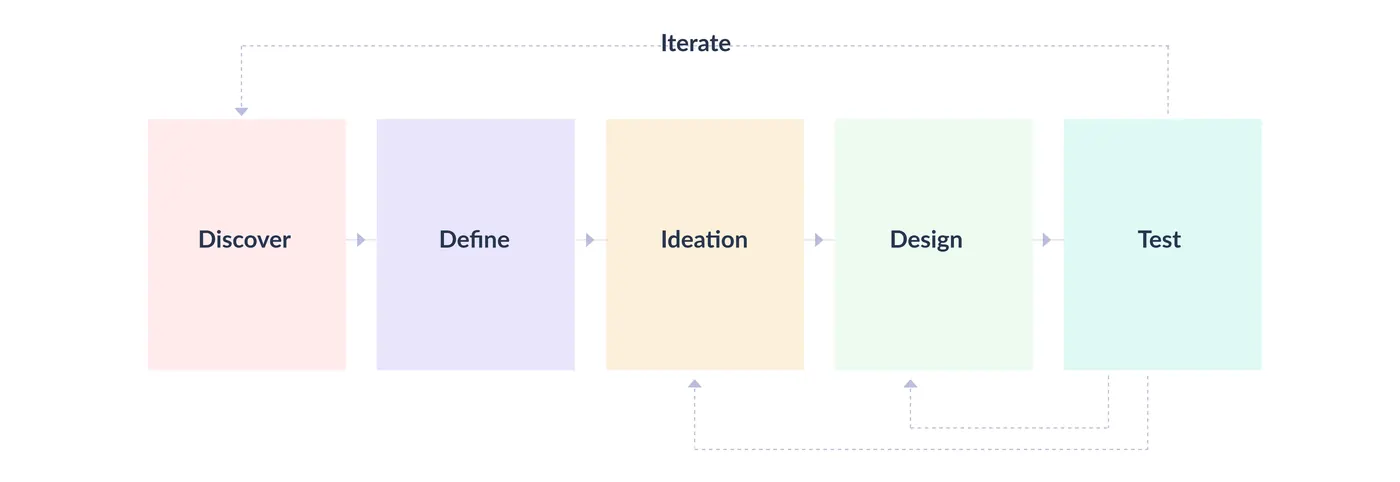
Discover, define, ideate, design, test — then loop back.


Design process: Discover, Define, Ideation, Design, Test, with an Iterate loop back into earlier stages
User Interviews

Talking to real traders before designing anything.

I conducted user interviews to build new personas and understand their pain points. Together with the team, we prepared an interview script with open-ended questions, focusing on our target audience's values, motivations, and daily routines. We recruited and interviewed 6 users remotely, aged between 21–57 years old.

Key Findings

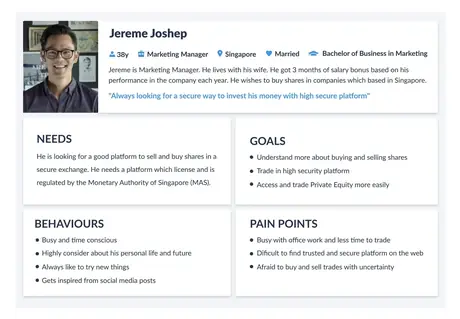
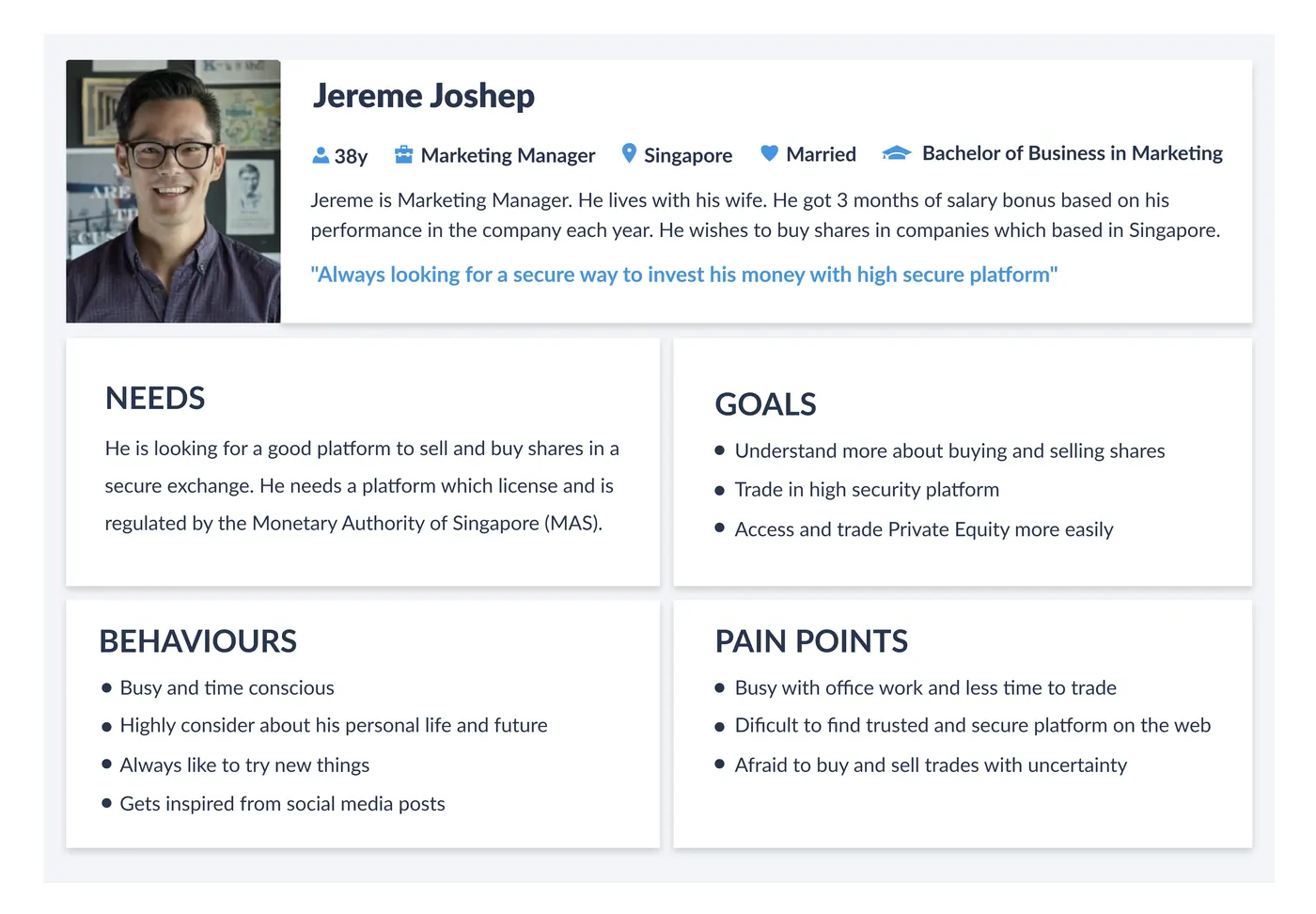
Based on the research analysis, I identified 3 user personas. They helped drive design decisions by highlighting common needs and pain points.


Proto-persona card for Jereme Joshep, a 38-year-old Marketing Manager based in Singapore

One of three personas built from the interview research.

User Journey Mapping

Seeing the whole trip, not just the screens.

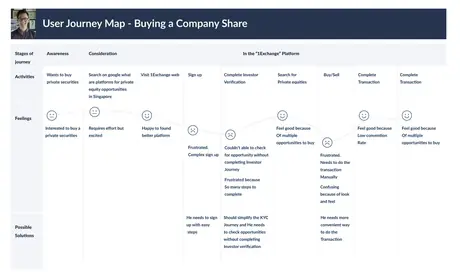
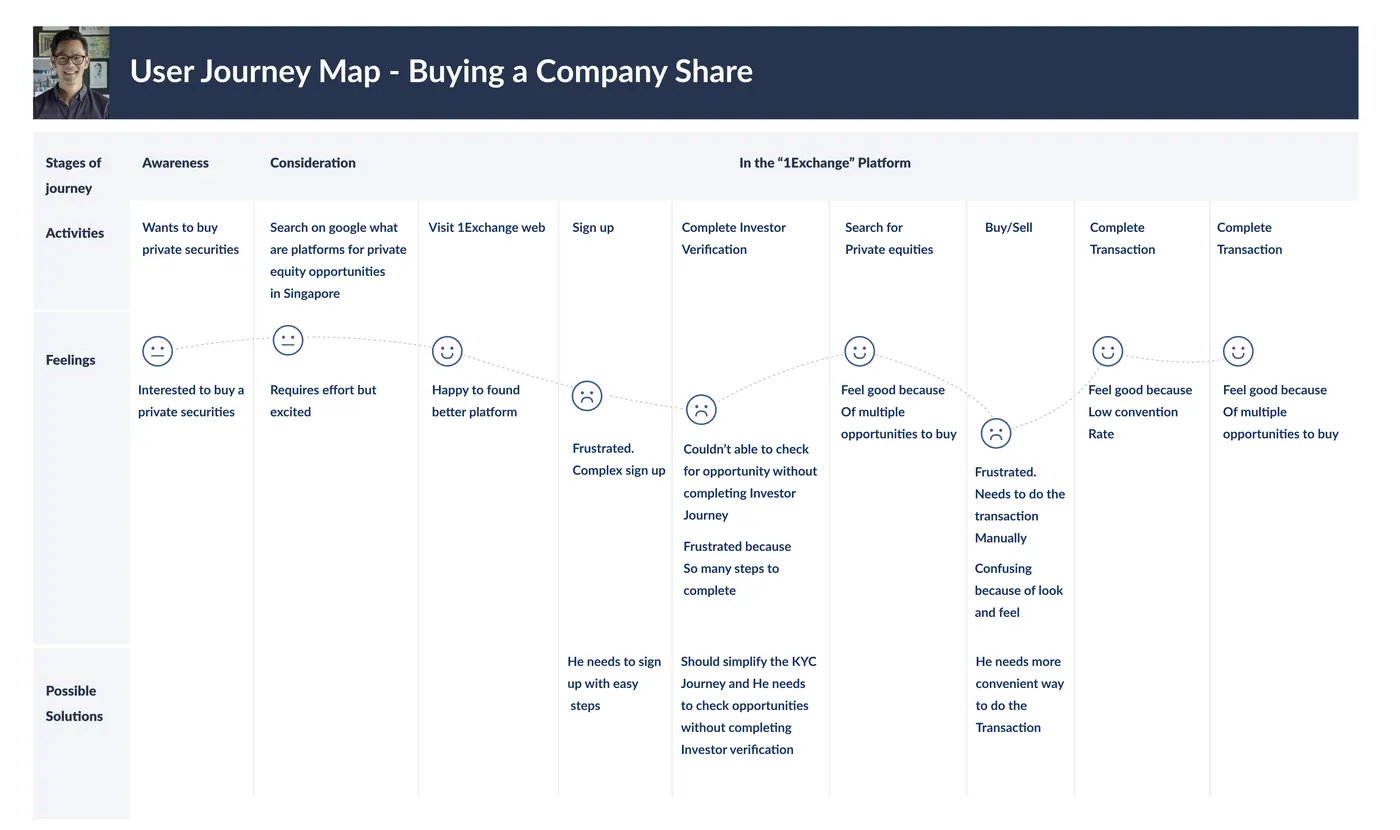
User journey maps helped me understand the context of users and gave a clear picture of the steps they'd go through when engaging with the product. Here's a quick view of one of the maps — mapping Jereme's journey revealed how helpful it would be for investors when they trade through the application.


User journey map for buying a company share, showing activities, feelings, and possible solutions across the Awareness, Consideration and 1Exchange platform stages
Key Findings & Solutions

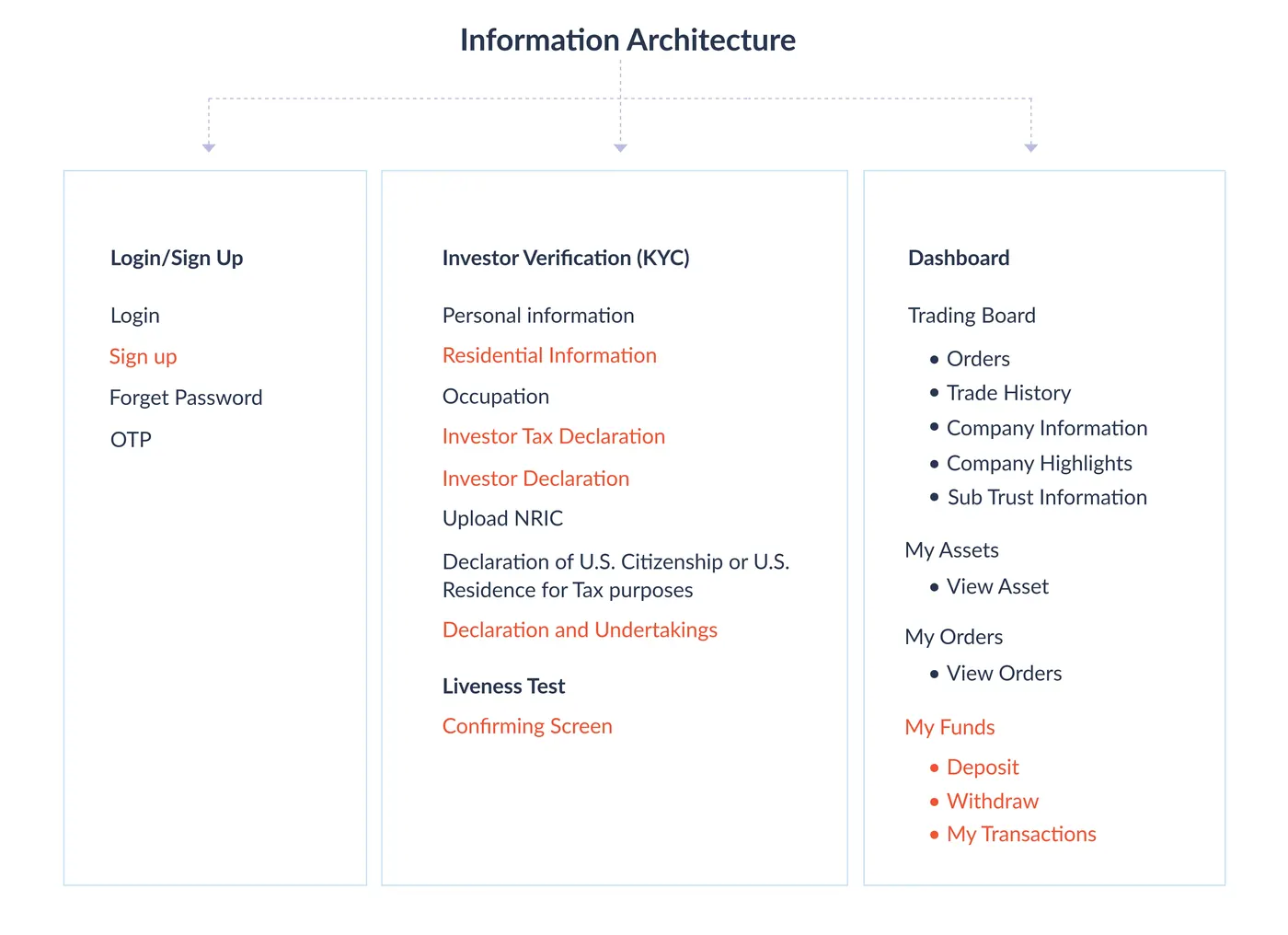
From frustration points to information architecture.

Based on the interview data and customer journey map data, I identified the main user frustration points and shared the findings with the marketing team and stakeholders.


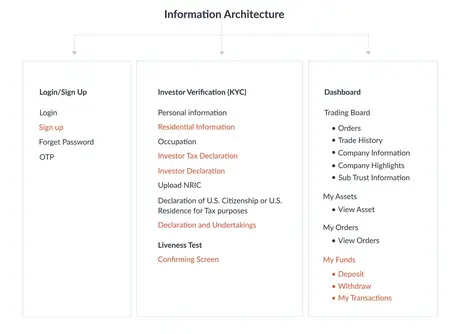
Information architecture diagram covering Login/Sign Up, Investor Verification (KYC), and Dashboard
  • The signup page should be more user friendly
  • Investors need to check the trading opportunities without completing the investor verification (KYC) process
  • The investor verification (KYC) process should be simpler, with easy steps
  • Needed our own wallet function, since users were frustrated with manual transactions when trading
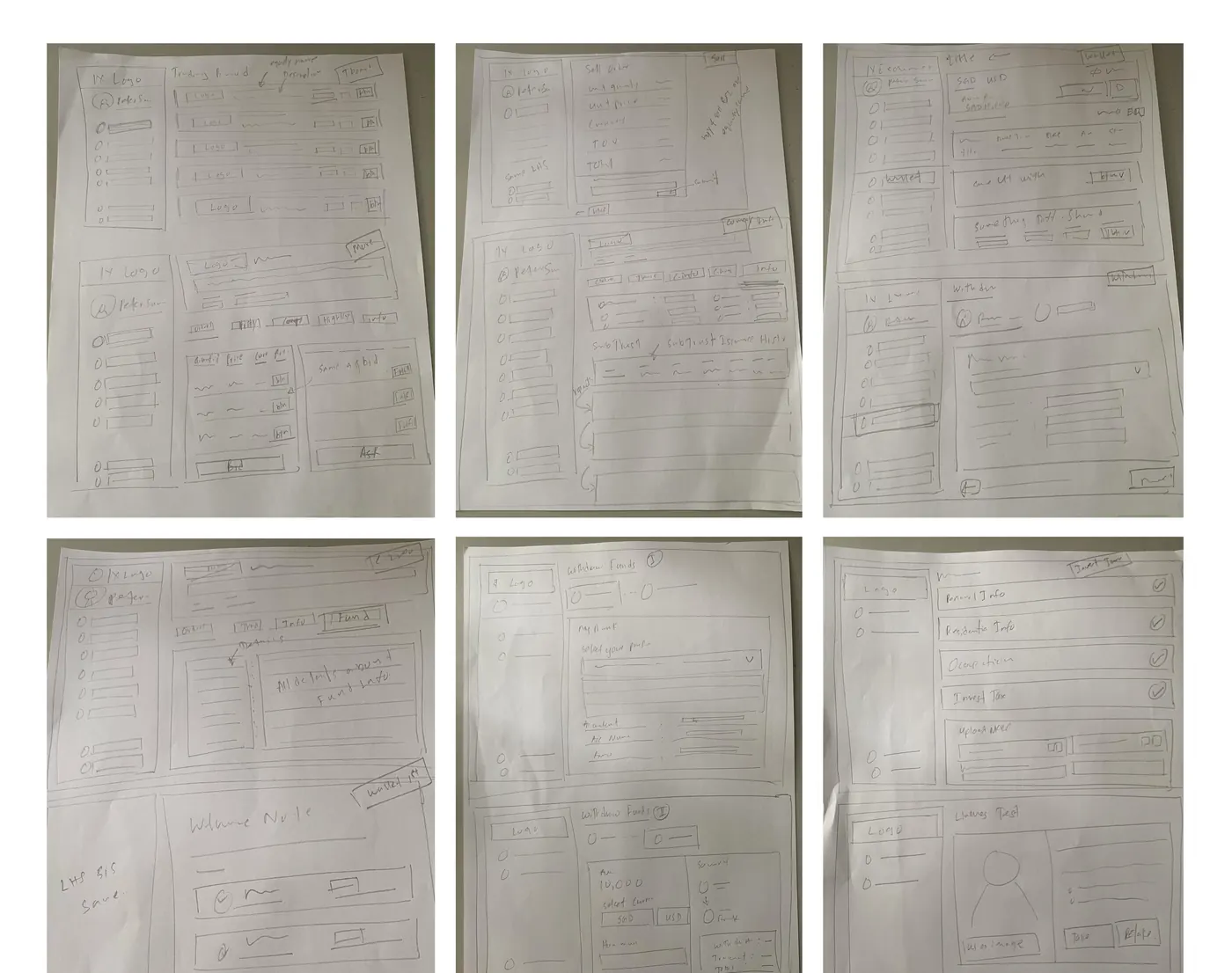
Sketches

Paper first, pixels later.

I began the design process with low-fidelity sketches and wireframes to accelerate decision-making through visualisation without losing time. The sketches were based on the initial user interviews and the business goal, and I came back to them throughout the entire process to stay anchored to the primary goals and ideas.


Six pages of hand-drawn paper wireframes covering the trading board, sell view, wallet, withdraw funds and investor verification flows
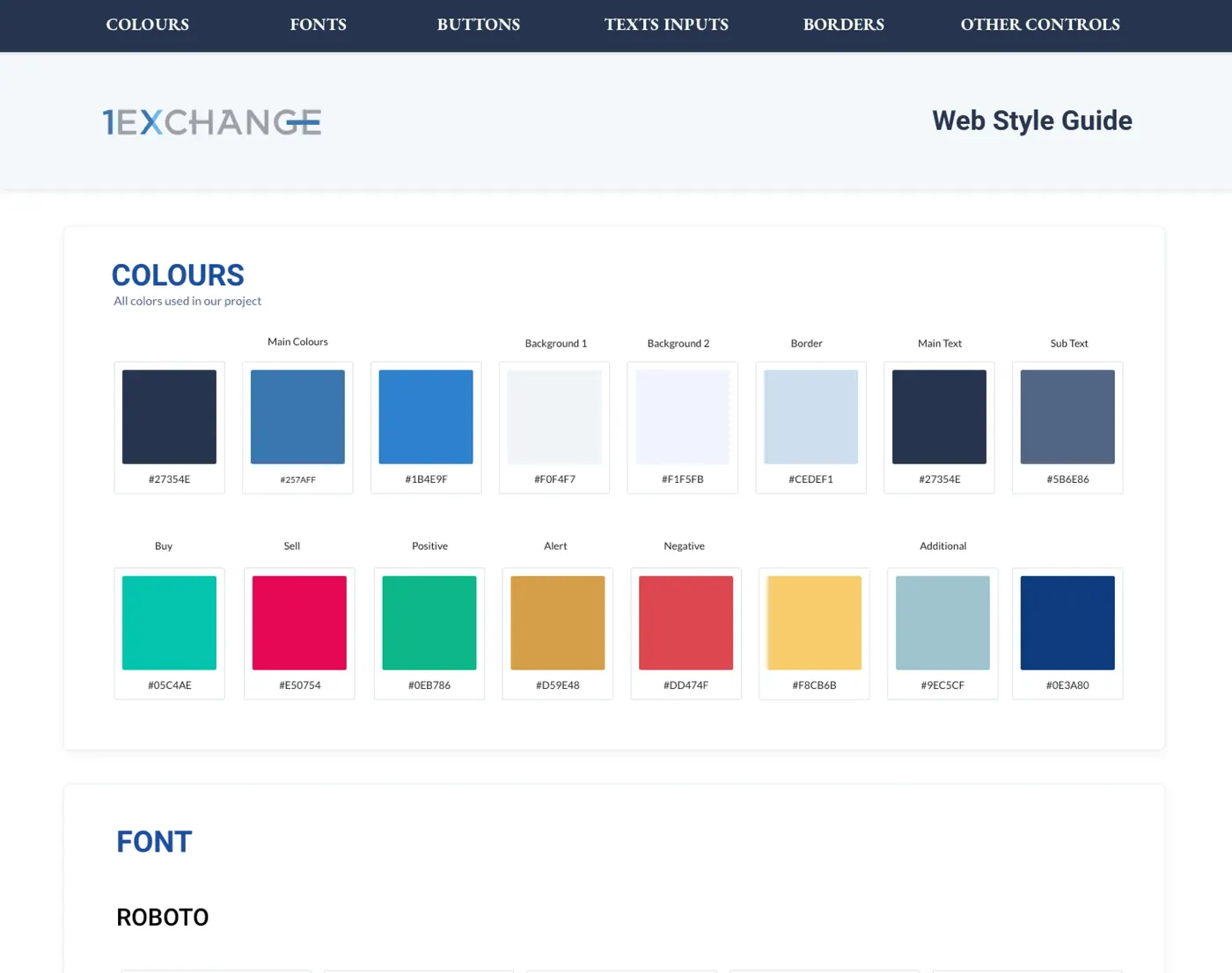
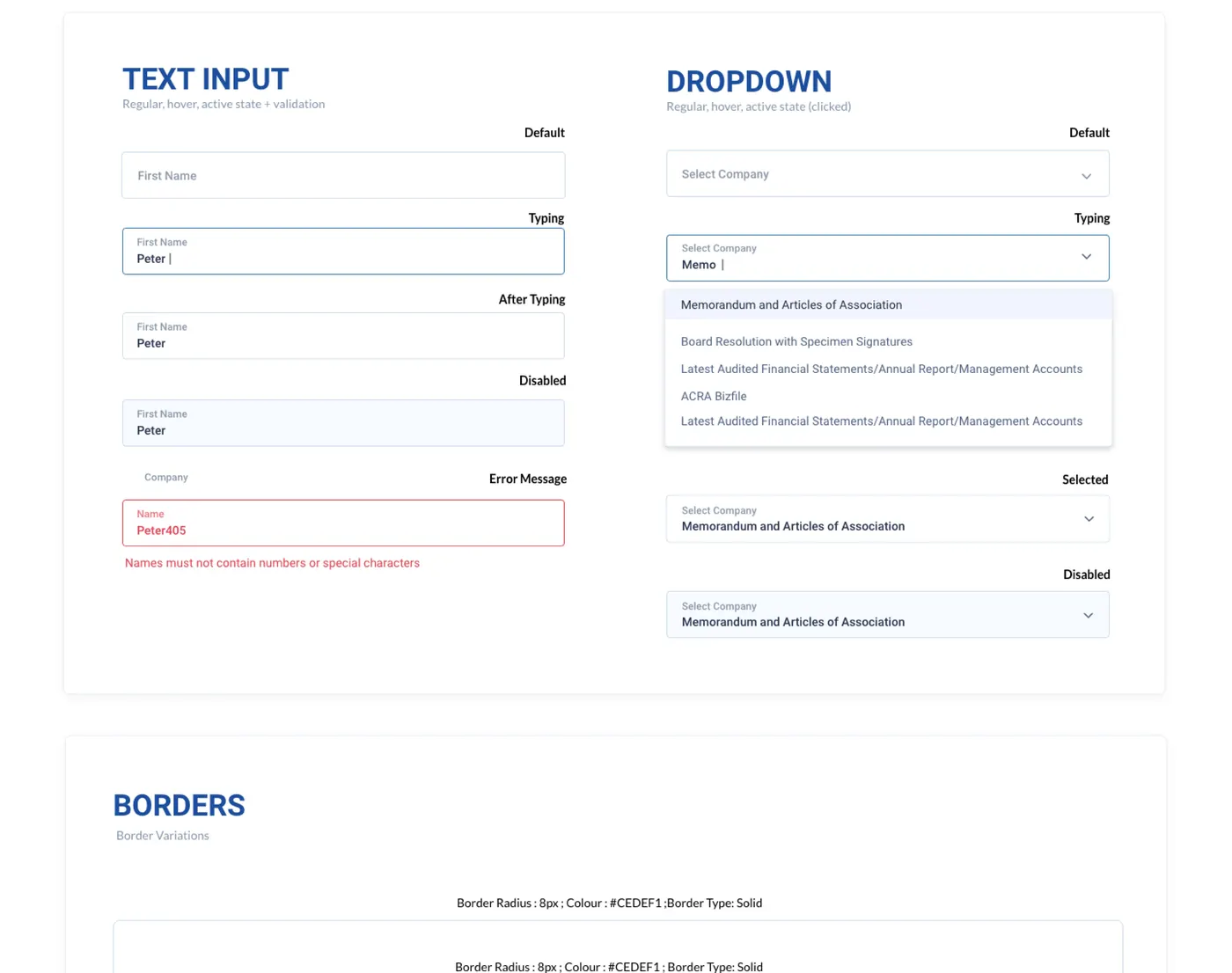
Create Style Guideline

Grounding the UI in 1X's own branding.

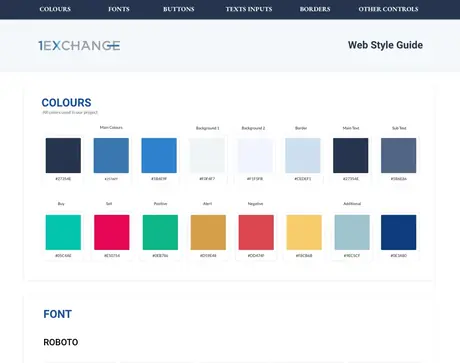
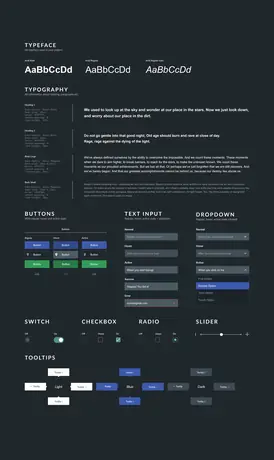
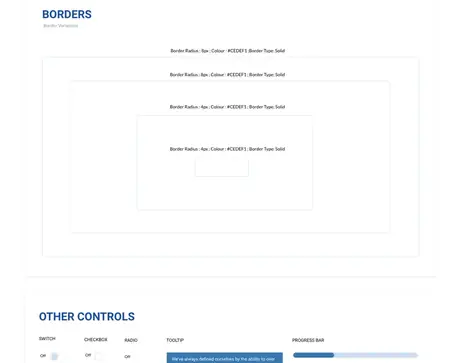
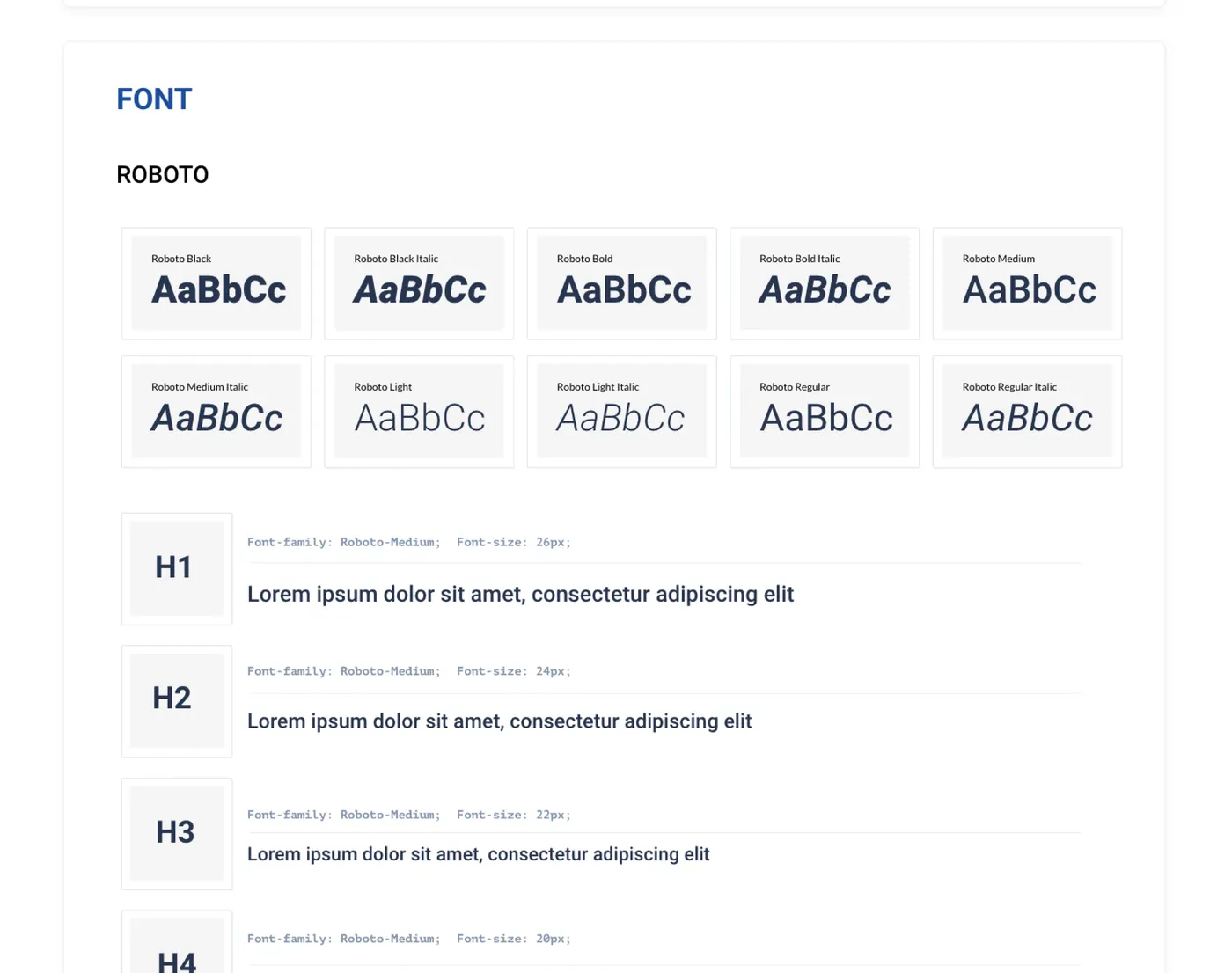
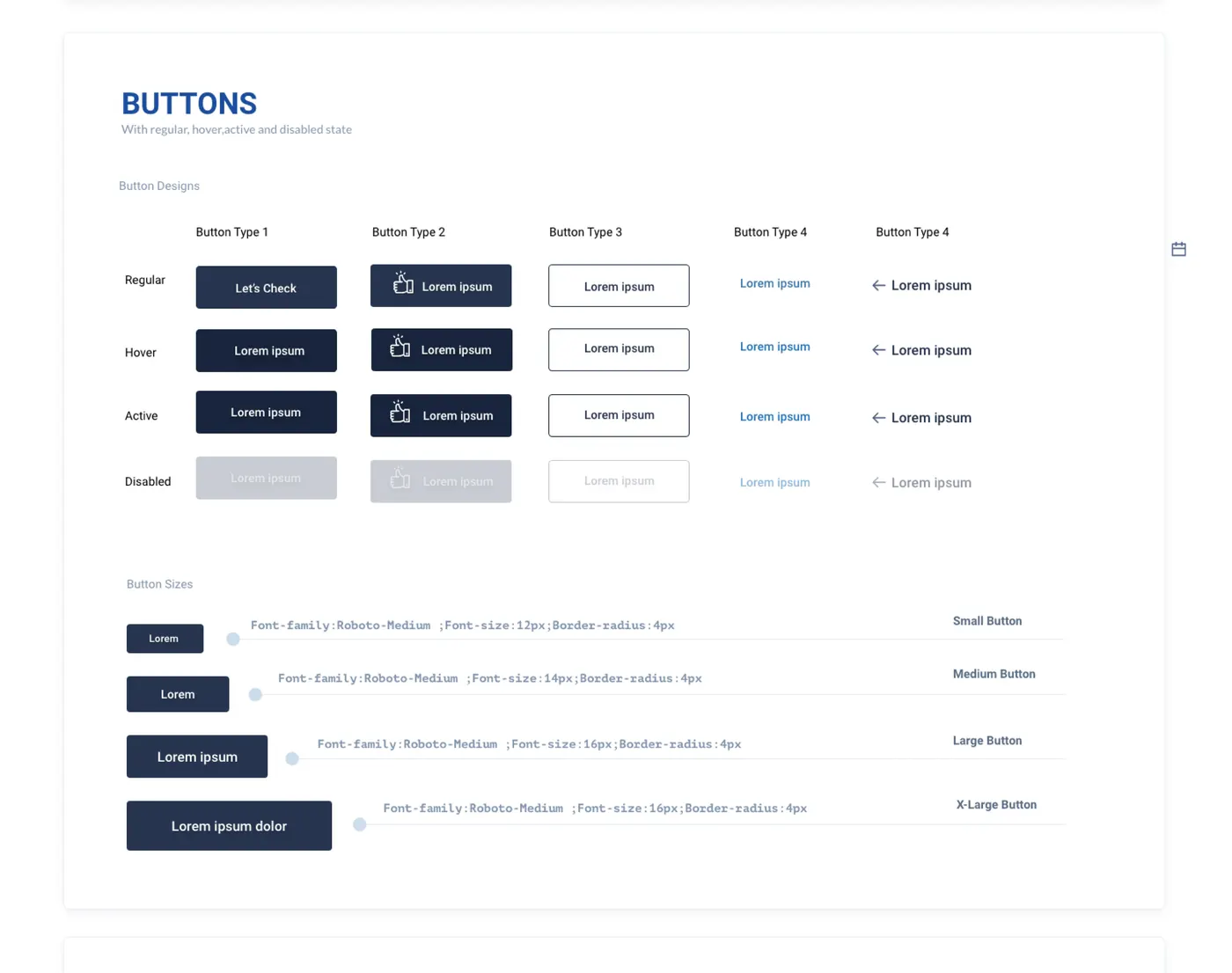
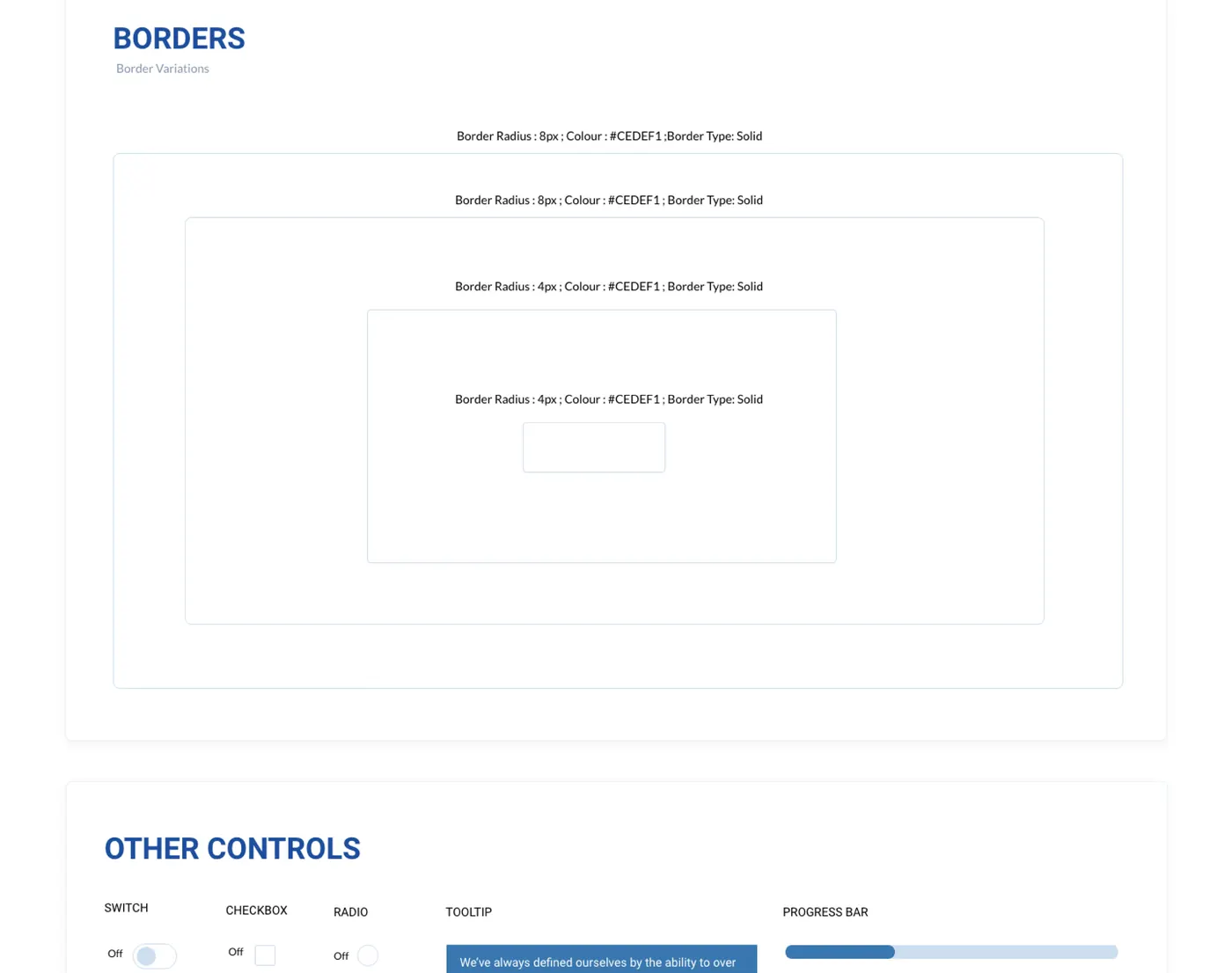
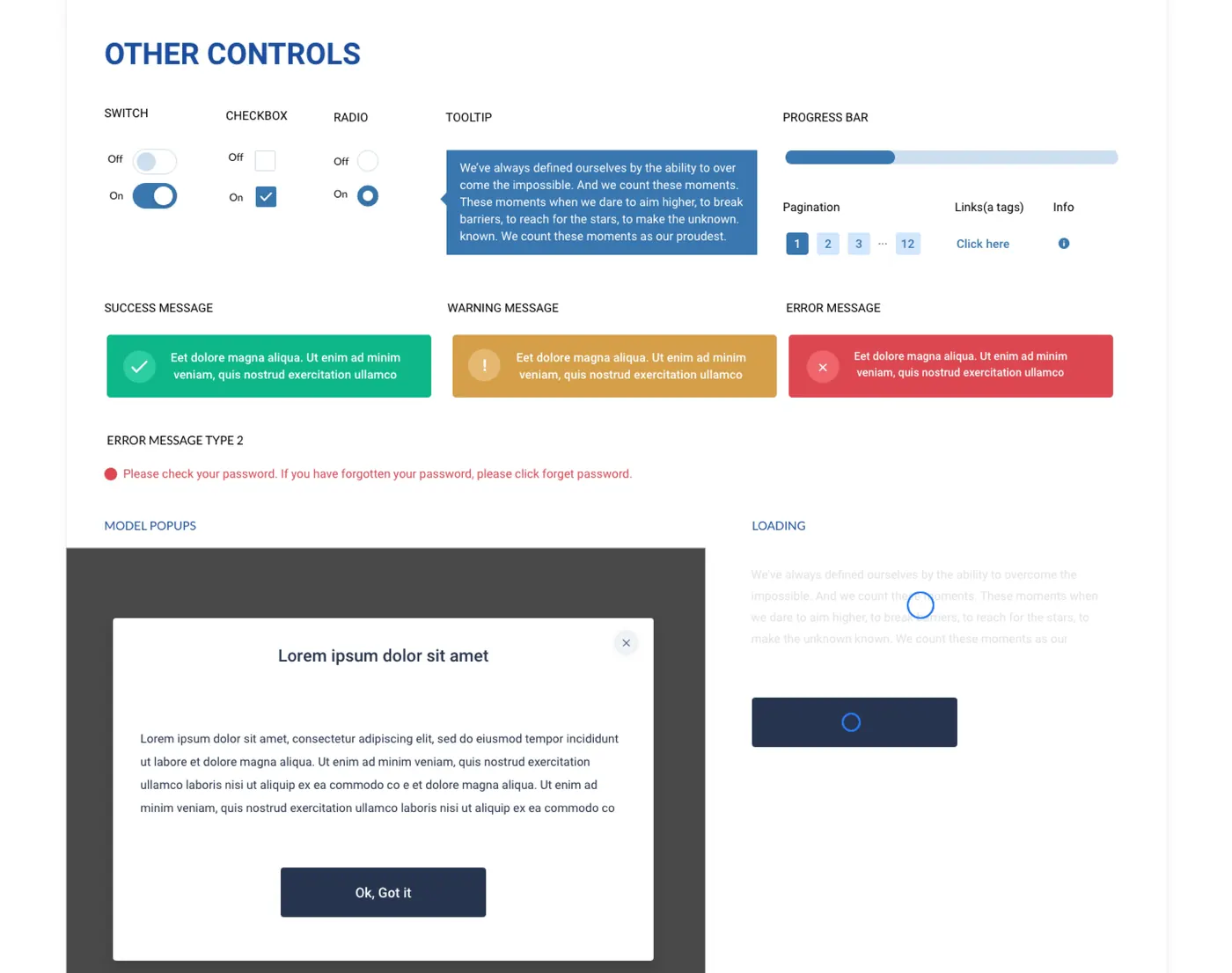
Before jumping into high-fidelity prototypes, I created a style guideline based on 1exchange's branding — colours, fonts, buttons, inputs, borders and other controls — so every screen after this point stayed consistent.


1Exchange web style guide: colours and font specimens
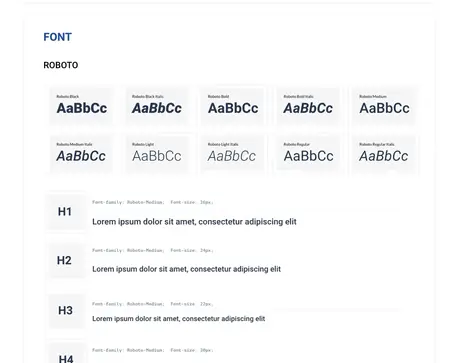
1Exchange web style guide: font weights and heading styles
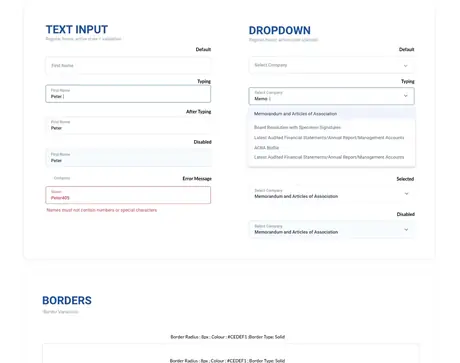
1Exchange web style guide: text inputs and dropdown states
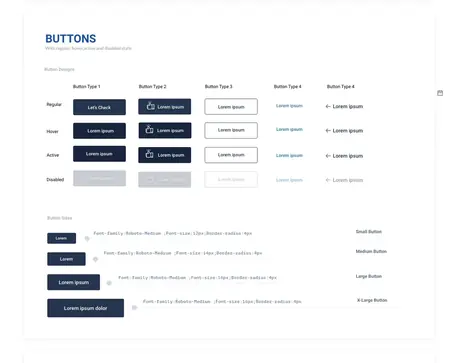
1Exchange web style guide: buttons, regular, hover, active and disabled states
1Exchange web style guide: borders and other controls
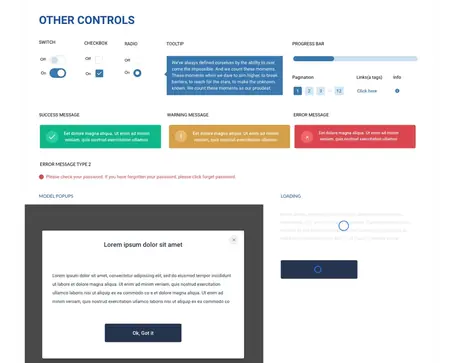
1Exchange web style guide: switches, checkboxes, radios, tooltips, messages and modals
High-Fidelity Wireframes

Straightforward, without cutting corners.

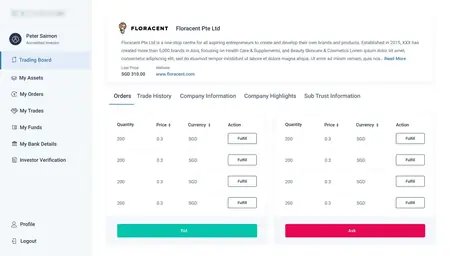
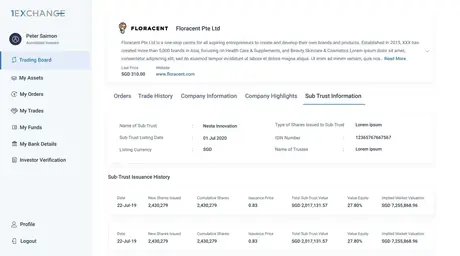
With the style guide completed, it was time for the hi-fi screens. I wanted the general look to be as straightforward and simplistic as possible without compromising the essential functions.


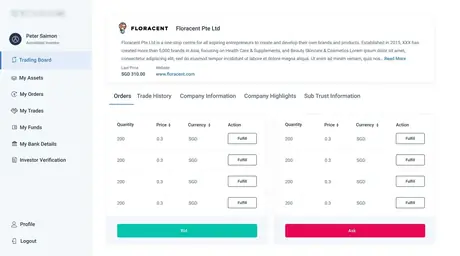
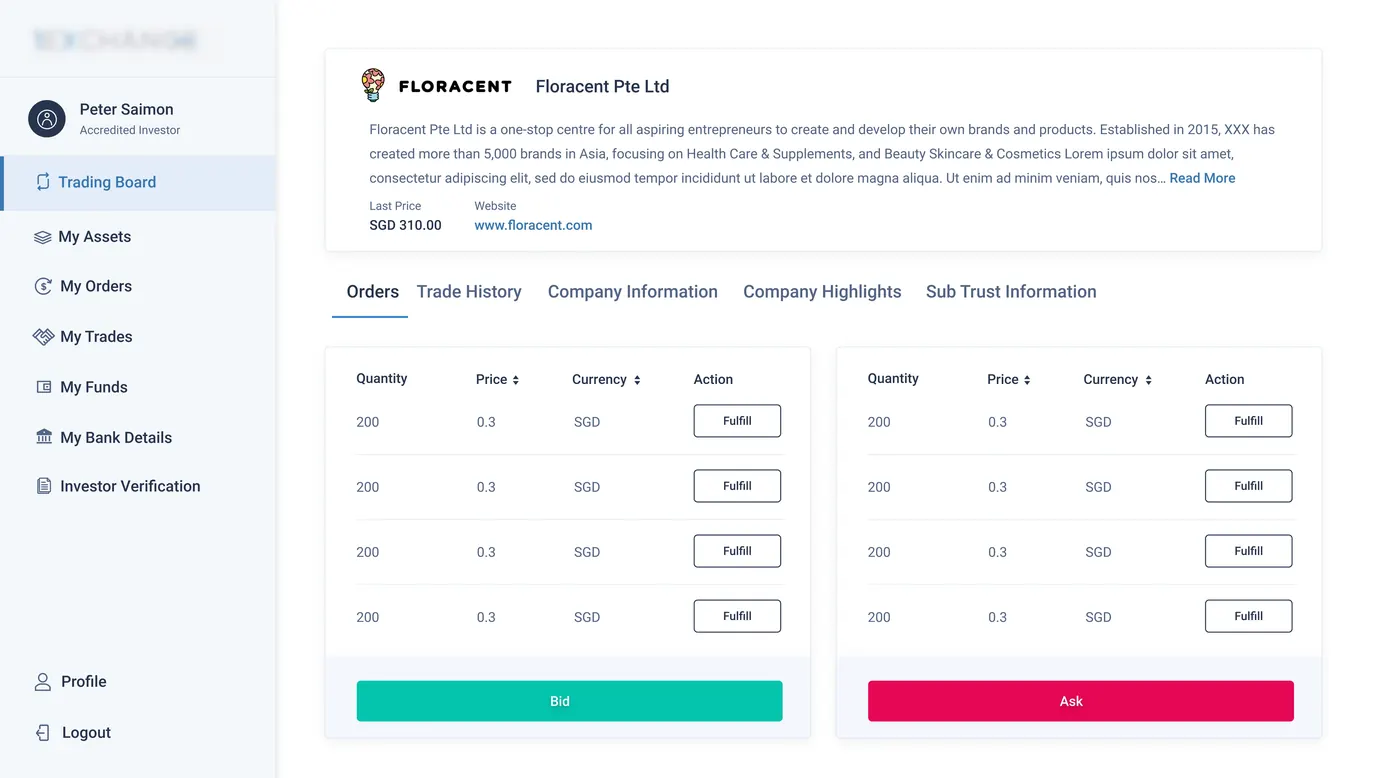
Trading board detail screen for Floracent Pte Ltd, showing bid and ask order tables
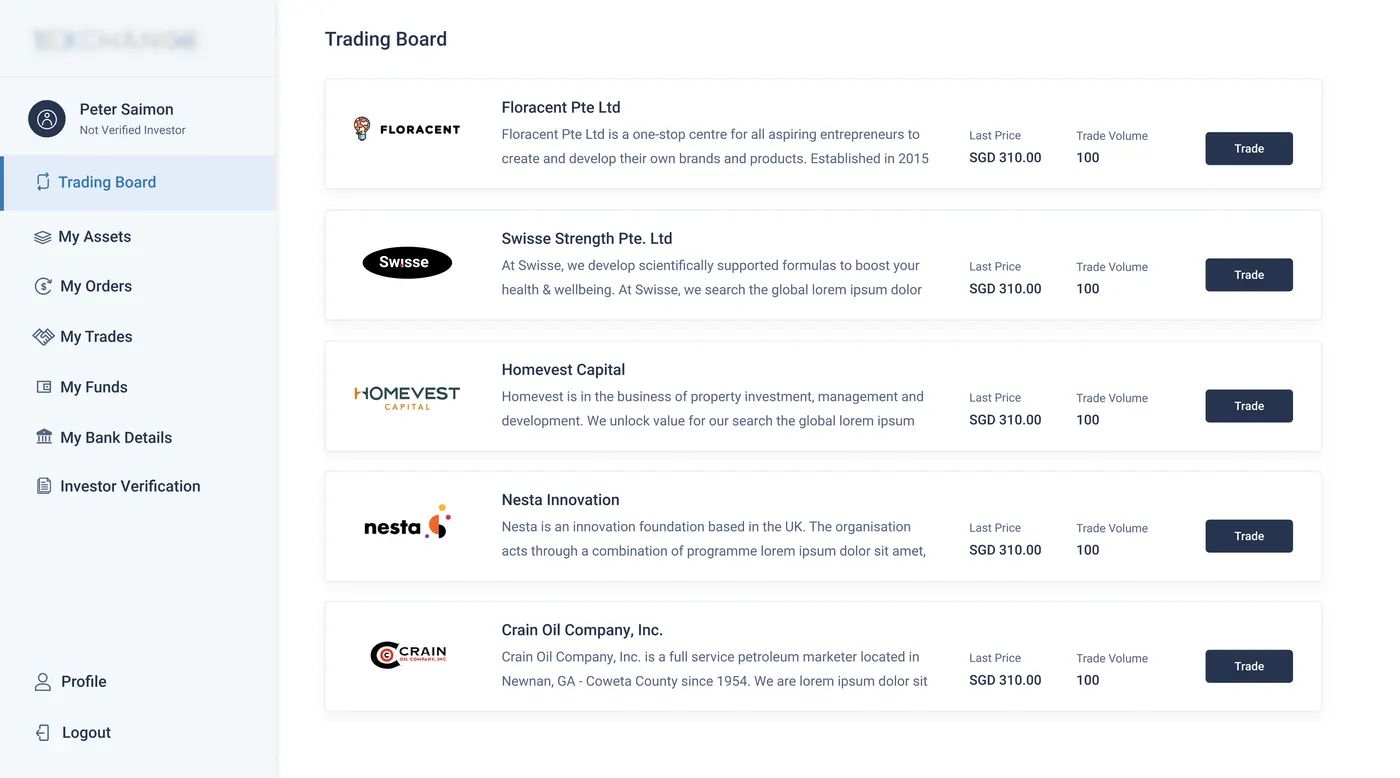
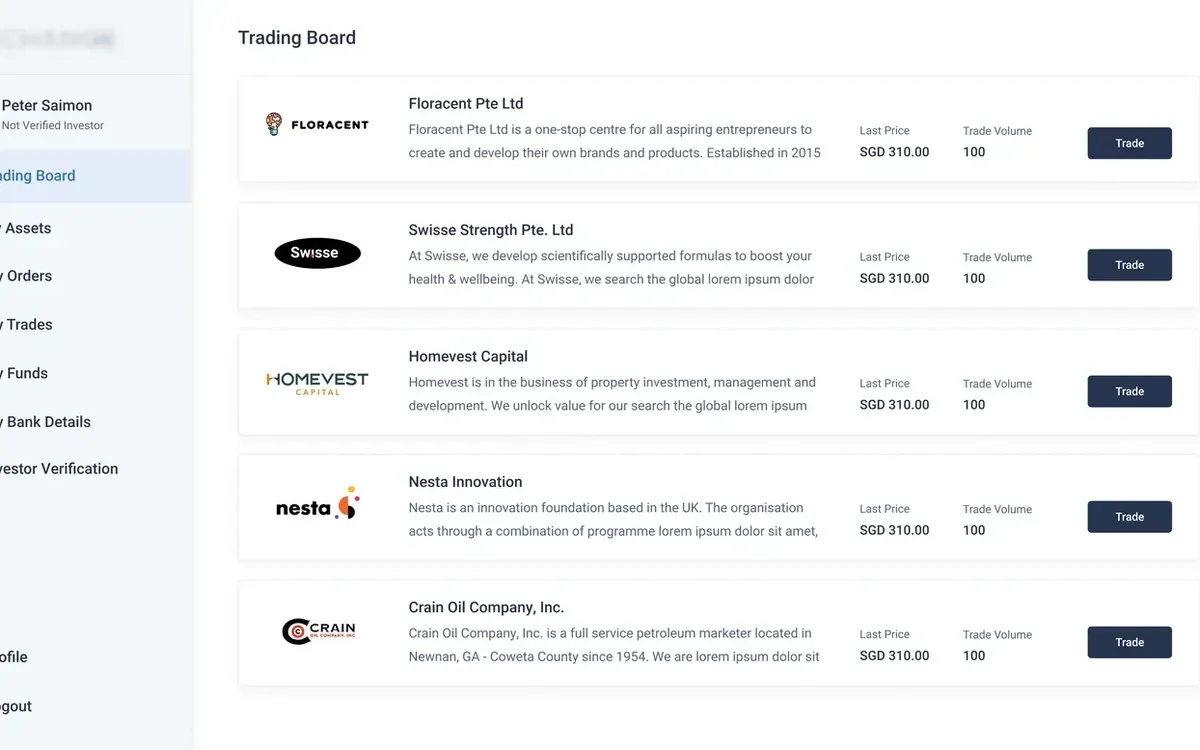
Trading board list screen showing multiple companies available to trade
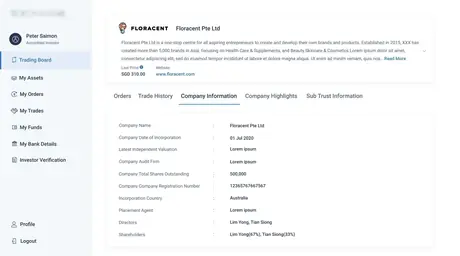
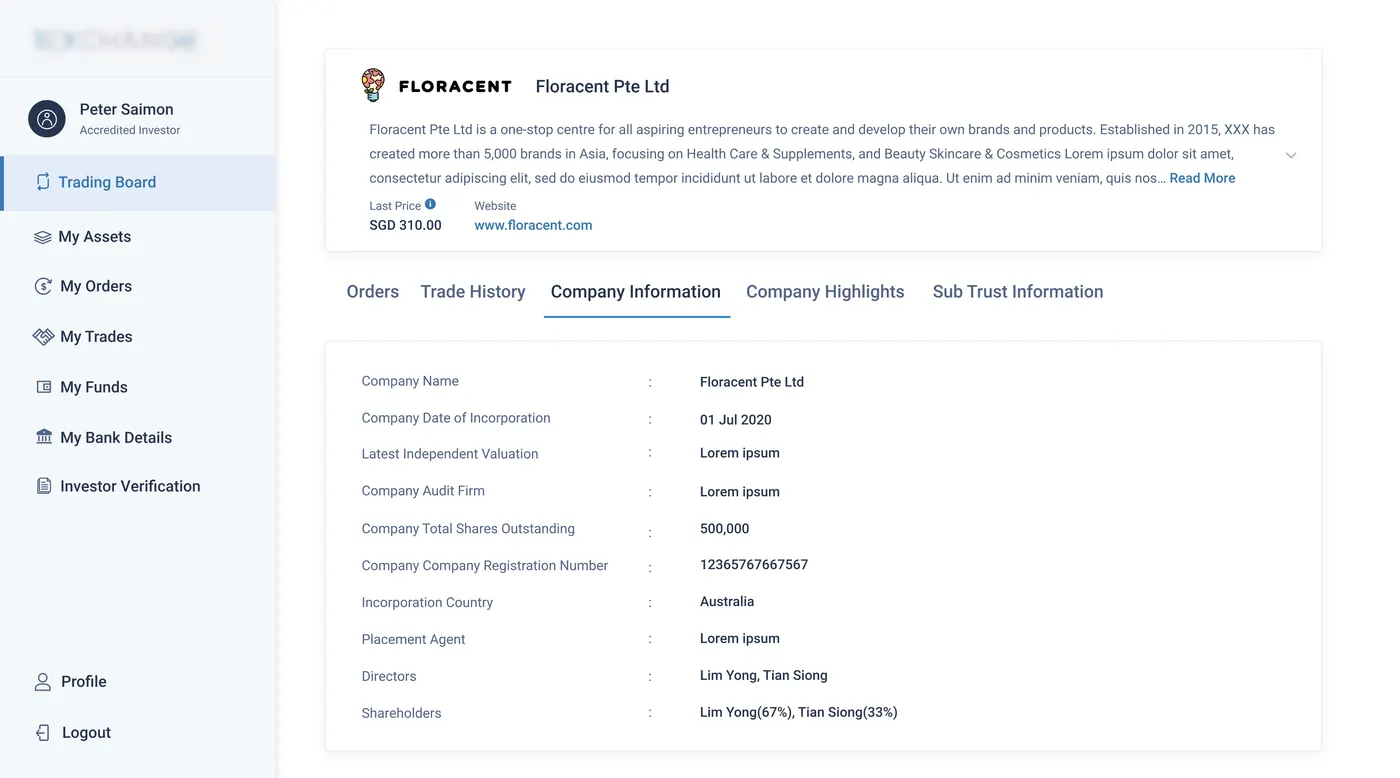
Company information tab showing incorporation details, valuation, shares and shareholders
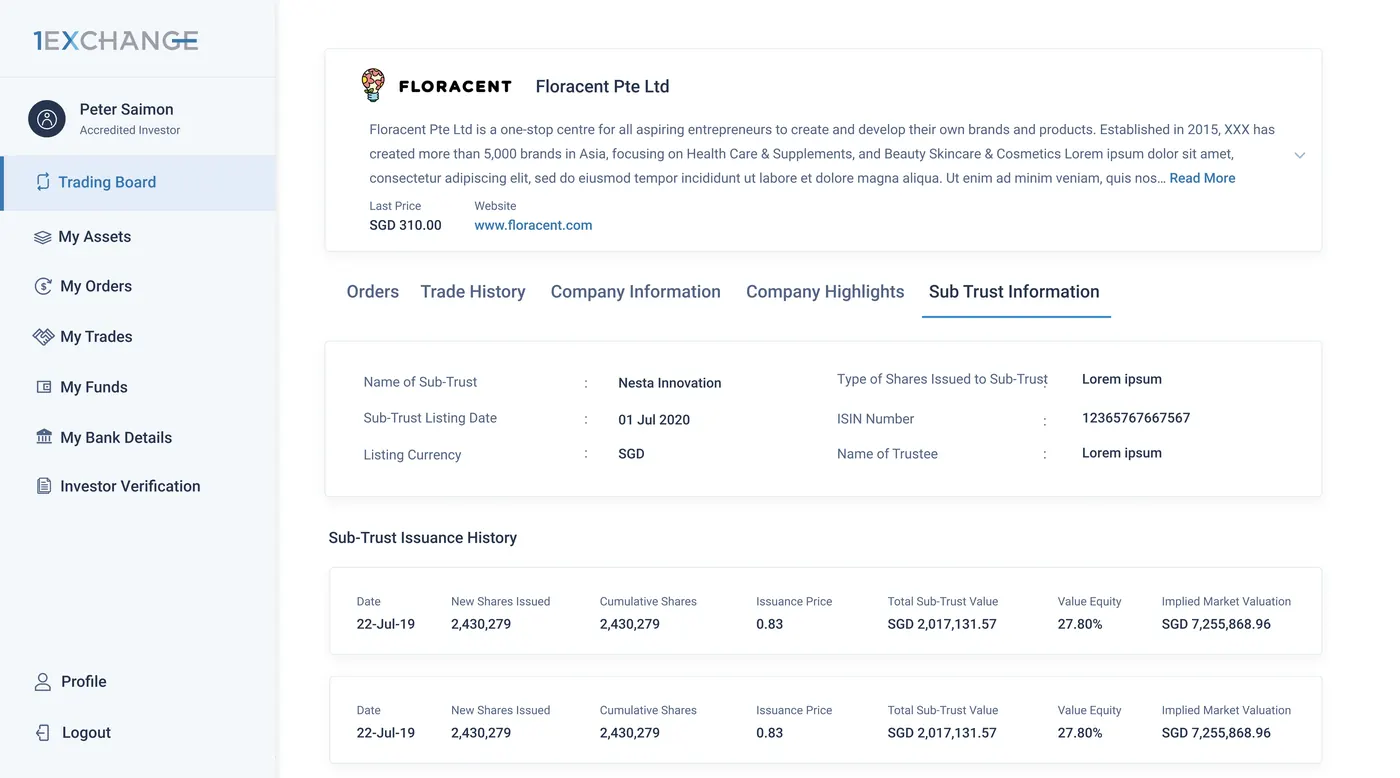
Sub-trust information tab showing sub-trust details and issuance history
Usability Testing

What actually held up, and what didn't.

Our goal was to figure out what difficulties users encountered when trying to complete core tasks in the 1exchange app — completing investor verification, adding bank details, using the wallet function, and buying and selling company shares.


Good Feedback

  • 80% of users found the new design of the 1X web application intuitive
  • Easy to sign up with just a few clicks
  • Users can buy/sell orders using 1X's own wallet
  • Easier to complete Investor Verification because of the new design
  • Users can see trading options without completing Investor Verification first

Needs Work

  • OTP not received sometimes
  • Users facing issues adding bank details
  • Transaction status not clear to users
  • The deposit flow is not clear
  • Users spending more time than expected on the Liveness test
The Complete Screen Set

Every flow, end to end.


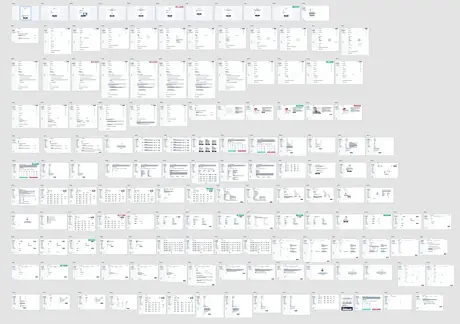
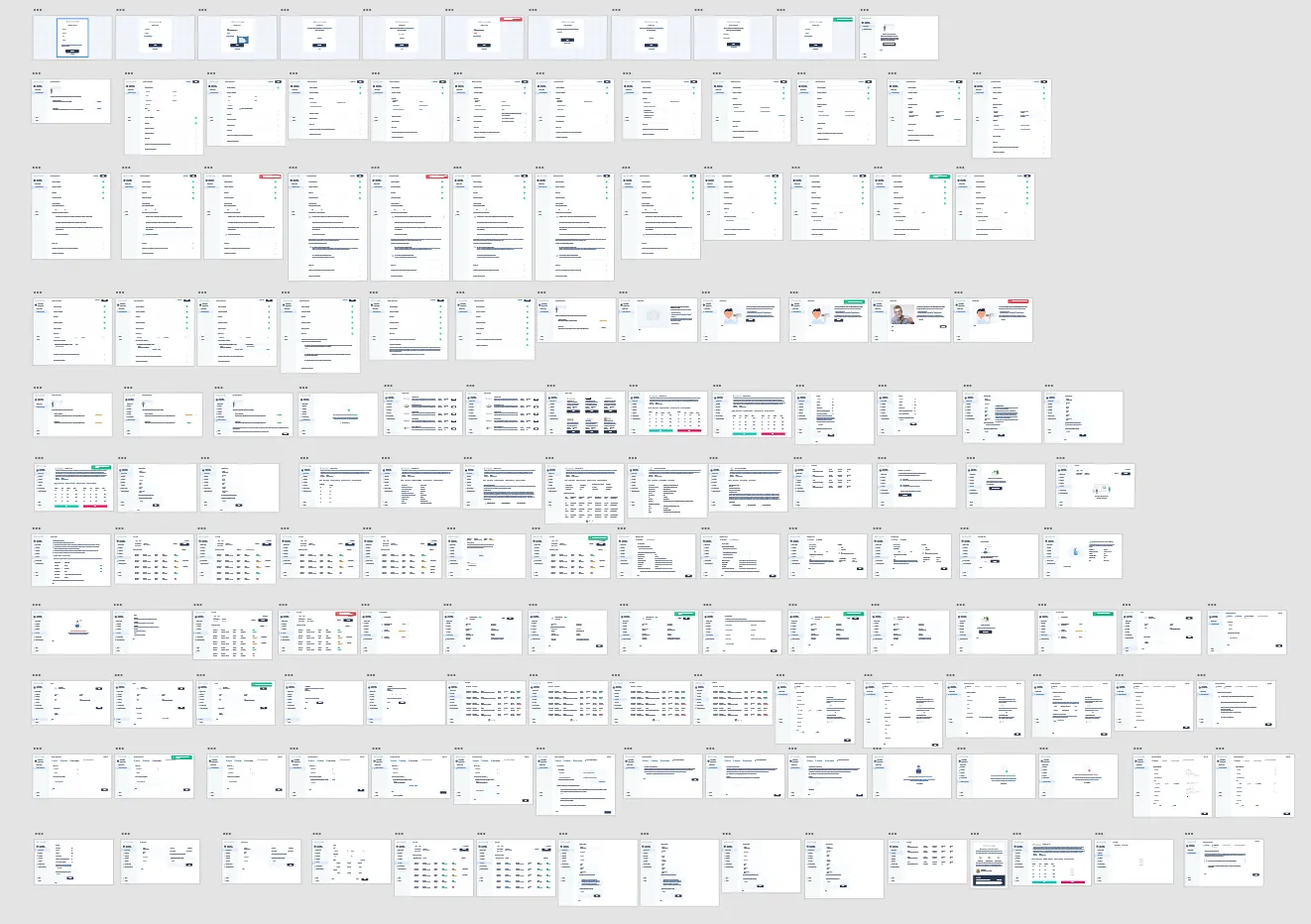
Overview grid of every screen designed for the 1Exchange web application, covering onboarding, KYC, trading, wallet and account flows
Reflection & Takeaways

Design is a constant iteration.

While designing the 1Exchange app, I learned that the first ideas for the app are only the beginning of the process. Usability studies and peer feedback influenced each iteration of the app's designs. I also learned that design is a constant iteration of improving the experience for the end user — user feedback plays an essential role in solving the real problems of the user.

All Work Case Study — UI/UX

iTraffic

A Traffic Management System (TMS)

Overview

About Project iTraffic

Project iTraffic (Traffic Management System) is providing permanent control across the network. It includes the collection of operational controls and user-facing solutions for coordinating the effective movement of people and goods across different modalities.

The Problem

The Problem

After discussing with the client we realize that iTraffic application did not follow the UI best practices. We had multiple discussions to understand their main requirements. They would like to improve their iTraffic application by cleaning up formatting, structure, padding, and margins in order to be smooth across their application with the latest UI. With target users, they would like to be memorable, eye-catching, and routinely resourceful. in a way that is simple, easy to read, skim, and community oriented.

Main areas which we suggested redesigning: Dashboard Area, CCTV Area and Map View

The Solution

The Solution

My team and I created thoughtful resolutions that addressed the key focus of this project: the onboarding process for the CCTV area, the Dashboard area and the MAP view. We conducted a heuristic evaluation, and competitive analysis, and used the primary research methods for some of the newly created widgets. So that we can locate and understand the areas of opportunity in the current product and competition. The primary UX research allowed us the ability to create improved and make better, user-centred design decisions. We handled any unexpected challenges successfully by adapting, compromising, and effectively communicating.

Before & After

Old vs new application

Challenges

Challenges

Approach

How did I solve these challenges?

Design System

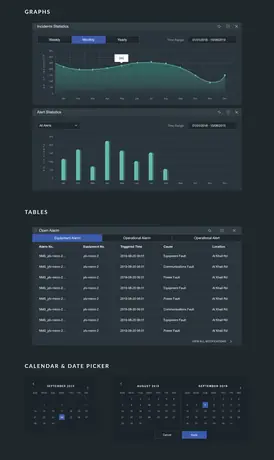
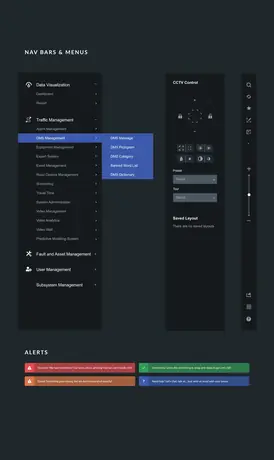
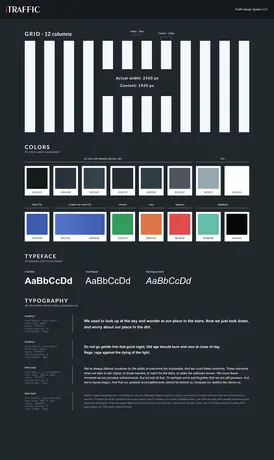
Style Guideline

Started the redesigning process by creating the style guideline. Because as an experienced designer I know, by providing clear and consistent guidance on design and development, a UI style guide can help teams to interfaces that are cohesive, intuitive, and effective.

Next Case Study
Website Design & Transformation →
All case studies
Website Design & Transformation

Beyond the Homepage

I redesign digital experiences by combining user needs, business goals and strong visual storytelling. Each concept explores how thoughtful UX decisions can transform an outdated, unclear or ordinary website into a more useful, engaging and memorable experience.

A collection of website redesigns and original UI concepts created through a user-centred design process.

Website Revamps Original UI Concepts
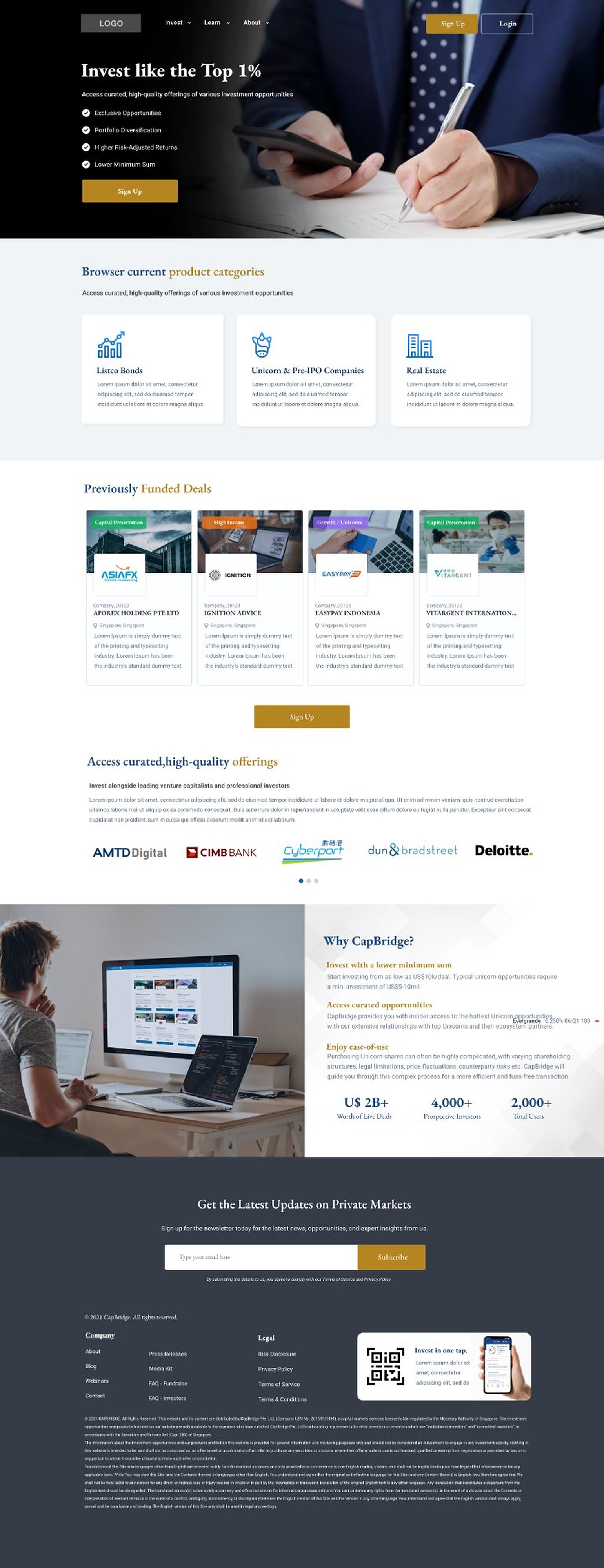
CapBridge landing page: an
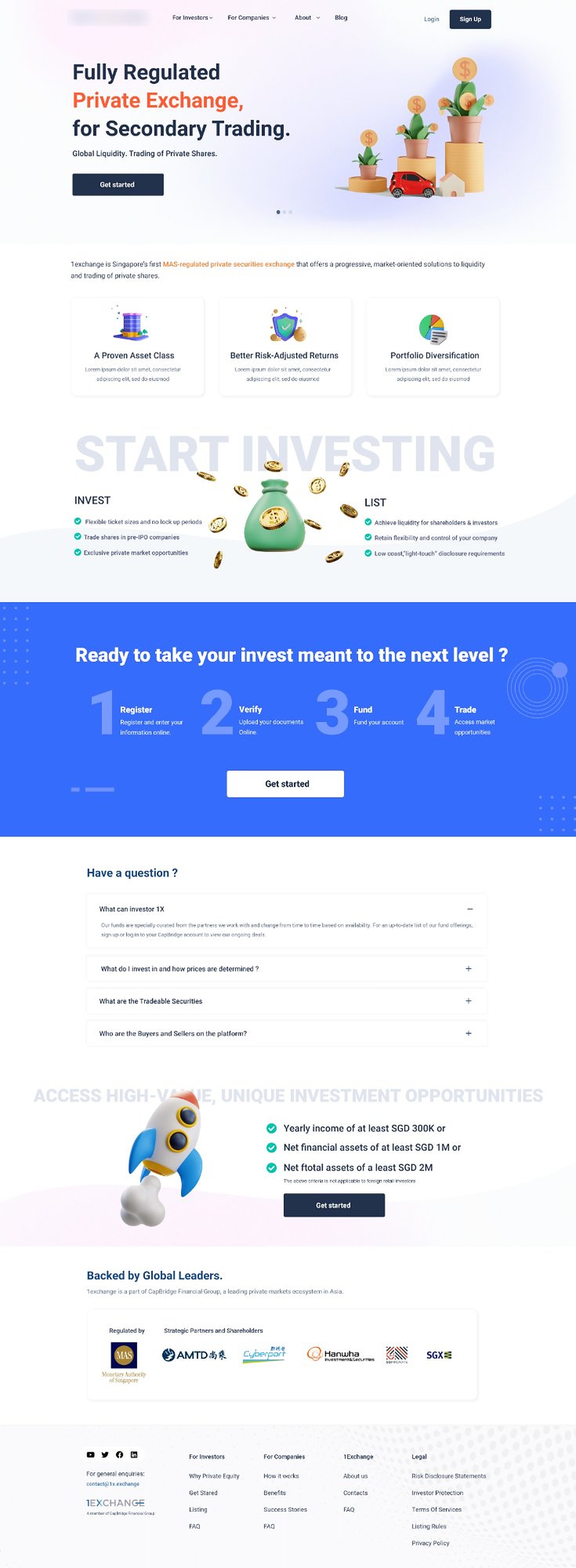
1Exchange landing page: a
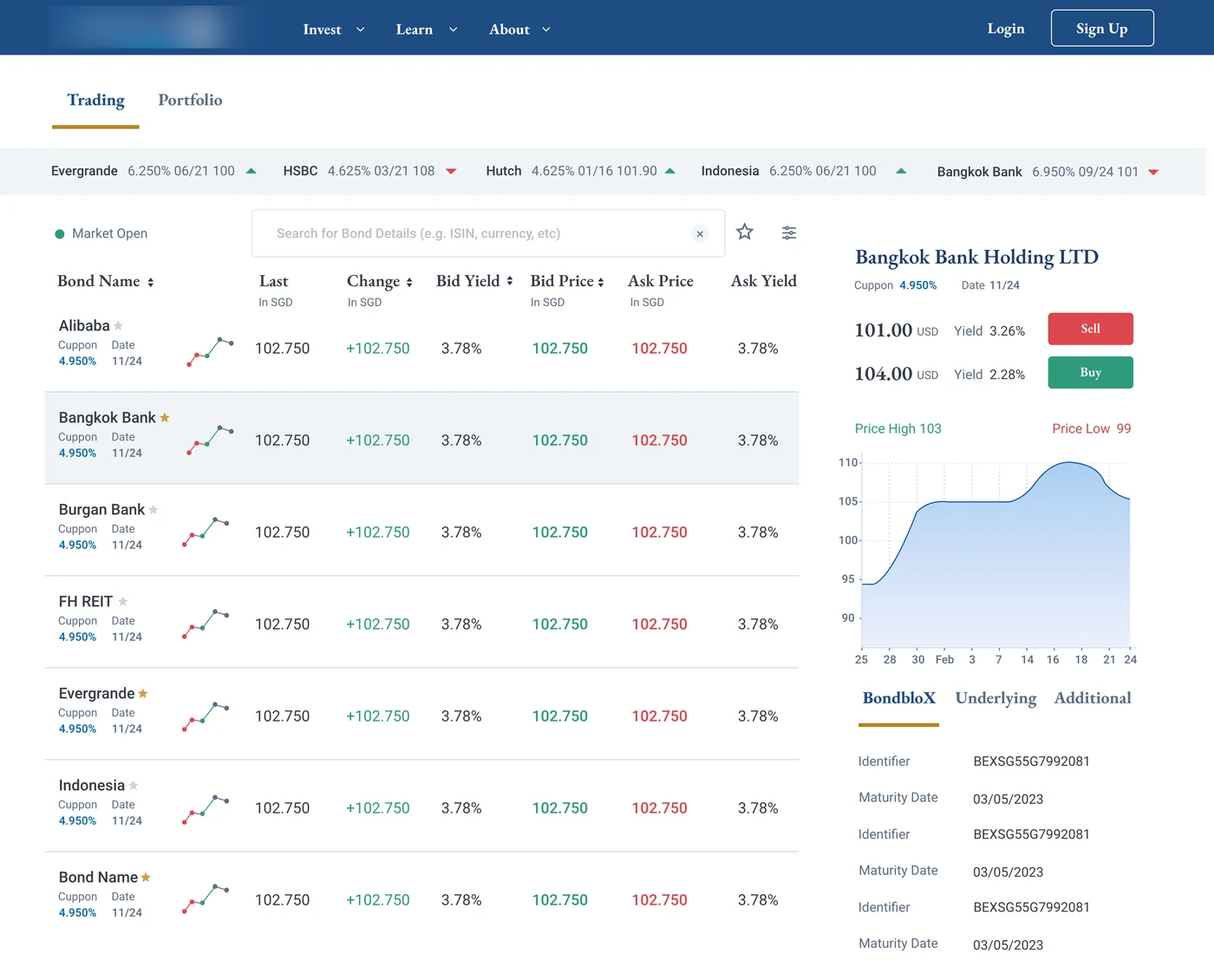
Bond trading screen: a searchable list of bonds with last price, change, bid and ask yields, beside a detail panel for Bangkok Bank Holding with buy and sell prices and a price chart.
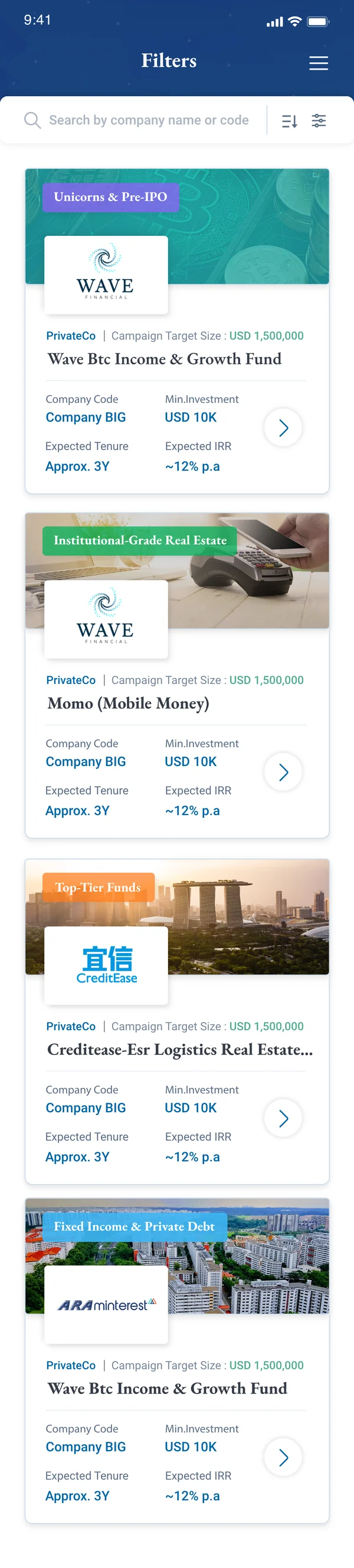
Mobile deals screen: filterable investment cards showing campaign target size, minimum investment, expected tenure and expected IRR.
Context

Why Websites Need to Evolve

A website earns a redesign when it stops doing its job — not when it stops looking current. These are the signals I look for first.

  • The visual style feels outdated
  • Users struggle to find important information
  • Navigation and user flows are confusing
  • The content hierarchy is unclear
  • The experience is inconsistent across pages
  • The mobile experience is poor
  • Accessibility requirements are not properly addressed
  • The website loads slowly or contains unnecessary elements
  • The design no longer represents the brand
  • Important calls to action are difficult to notice
  • The website is not supporting current business goals

A redesign should solve real usability, communication or business problems — not simply make the interface look different.

Process

My Design Approach

Two starting points, one discipline. Whether the site exists already or not, the work moves from understanding to structure to surface — never the other way round.

Path A

Revamping an Existing Website

  1. 01

    Understand

    Review the website, target audience, business objectives, content and primary user journeys.

  2. 02

    Audit

    Evaluate usability, navigation, visual hierarchy, consistency, responsiveness, accessibility, content clarity and calls to action.

  3. 03

    Identify Opportunities

    Document the main user problems and determine what should be improved, retained or removed.

  4. 04

    Restructure

    Improve the information architecture, page hierarchy, navigation and user flows.

  5. 05

    Explore

    Develop moodboards, layout directions, wireframes and different visual concepts.

  6. 06

    Redesign

    Create a modern interface with a clear hierarchy, consistent components and stronger brand expression.

  7. 07

    Validate

    Review the design against user needs, accessibility guidelines, responsive behaviour and business goals.

  8. 08

    Refine

    Improve the final design based on findings and prepare reusable components for future pages.

Path B

Creating a Website From Scratch

  1. 01

    Define the Problem

    Understand what the website needs to achieve and who will use it.

  2. 02

    Research

    Study the audience, market, competitors and relevant design patterns.

  3. 03

    Establish Requirements

    Define essential content, features, pages, user actions and technical constraints.

  4. 04

    Plan the Experience

    Create the sitemap, content hierarchy and key user flows.

  5. 05

    Wireframe

    Develop low-fidelity layouts focused on structure, usability and content placement.

  6. 06

    Define the Visual Direction

    Establish typography, colours, spacing, imagery, iconography and interaction style.

  7. 07

    Design the Interface

    Create responsive desktop, tablet and mobile screens using reusable components.

  8. 08

    Prototype and Review

    Test key interactions, identify usability issues and refine the experience.

From scratch

New Pages for 1Exchange

Newly created web designs for the 1Exchange investment platform — eight pages designed end to end, from the investor story to listing, FAQ and contact. Select any page to see it full size.

Checklist

What I Consider When Designing

Held in view on every screen, whatever the industry.

  • User needs and expectations
  • Business objectives
  • Target audience
  • Content hierarchy
  • Information architecture
  • Navigation and user flows
  • Readability and typography
  • Brand personality
  • Visual consistency
  • Responsive behaviour
  • Accessibility and colour contrast
  • Calls to action and conversion
  • Performance considerations
  • Scalable design components
  • Micro-interactions and feedback
  • Overall usability
Performance

How I Keep Websites Fast

Speed is part of the design, not a clean-up task at the end. A slow page loses people before they have seen a single decision on it, so these are settled while the layout is still being drawn.

The targets I design to — Google’s Core Web Vitals “good” thresholds

LCP ≤ 2.5 s Largest Contentful Paint

How quickly the main content appears.

INP ≤ 200 ms Interaction to Next Paint

How quickly the page responds to a tap or click.

CLS ≤ 0.1 Cumulative Layout Shift

How much the layout jumps while it loads.

  1. 01Right-size every image

    Modern formats such as WebP and AVIF, exported at the size they are displayed, with responsive srcset so a phone never downloads a desktop image.

  2. 02Load what is seen first

    The main hero image is loaded early and given priority; everything below the fold is lazy-loaded.

  3. 03Reserve space for media

    Width, height and aspect-ratio set on images, video and embeds, so nothing jumps when it arrives.

  4. 04Keep fonts lean

    Fewer families and weights, subsetted files, font-display: swap and a preload for the one face the first screen needs.

  5. 05Ship less JavaScript

    Unused scripts and plugins removed, non-critical code deferred, and heavy features split so they only load where they are used.

  6. 06Trim the CSS

    Critical styles for the first screen inlined, unused rules removed, and one consistent component system instead of page-by-page overrides.

  7. 07Audit third-party scripts

    Every tracker, chat widget and embed has to justify its cost; the rest are removed or loaded after the page is usable.

  8. 08Cache and compress

    Static assets served from a CDN with long cache lifetimes and Brotli or Gzip compression.

  9. 09Design lighter pages

    No autoplaying video or carousel carrying the first screen, SVG icons instead of icon fonts, and every section asked whether it earns its weight.

  10. 10Measure before and after

    Lighthouse and PageSpeed Insights for the lab view, real-user Core Web Vitals for the field view — checked before a change ships and again after.

Search

How I Design for Search

Search engine optimisation starts in the structure, not the copy. The same decisions that make a site clear to a person — a sensible hierarchy, one purpose per page, fast and accessible screens — are the ones that make it legible to a search engine.

01Technical foundations

  • Clean structure and URLs

    A logical sitemap, readable URLs and internal links that follow the information architecture.

  • Crawlable and indexable

    An XML sitemap, a considered robots.txt and canonical tags so duplicate pages do not compete.

  • Mobile-first and fast

    Responsive layouts and Core Web Vitals in the green, because search engines rank the mobile experience.

  • Structured data

    Schema.org markup in JSON-LD for the organisation, articles, FAQs and breadcrumbs, so results can show richer snippets.

02On-page

  • One intent per page

    Each page is planned around a single primary search intent, mapped during keyword research.

  • Semantic HTML and headings

    One H1, an ordered H2 and H3 hierarchy, and real landmarks rather than styled divs.

  • Titles and meta descriptions

    Written for every page to describe it accurately and earn the click.

  • Descriptive images

    Meaningful alt text and file names, which also serve screen-reader users.

03Content and measurement

  • Content that answers the question

    Copy structured around what people actually search for, with scannable sections.

  • Share-ready pages

    Open Graph and social meta tags, so a shared link shows the right title and image.

  • Accessible by default

    Clear language, contrast and keyboard access — good for people and for search.

  • Monitor and iterate

    Google Search Console and analytics to track queries, coverage and clicks, and to decide what to improve next.

Principles

What holds it all together

  1. 01

    Clarity before decoration.

  2. 02

    Every section should have a purpose.

  3. 03

    Consistency builds trust.

  4. 04

    Responsive design is part of the experience.

  5. 05

    Accessibility is a design requirement.

  6. 06

    Visual appeal should support usability.

  7. 07

    Good design connects user needs with business goals.

Every Screen Has a Reason

These explorations demonstrate how I approach different industries, audiences and design challenges. Although the visual direction changes, every experience is built around clarity, usability, consistency and purpose.

Have a website that needs a fresh perspective?

Let’s Work Together
All Work Mobile app redesign · Fintech

CapBridge Investments

CapBridge gives individual investors access to curated private-market opportunities—including pre-IPO companies, top-tier funds, institutional-grade bonds, private debt, and real estate—all through a convenient mobile and web platform.

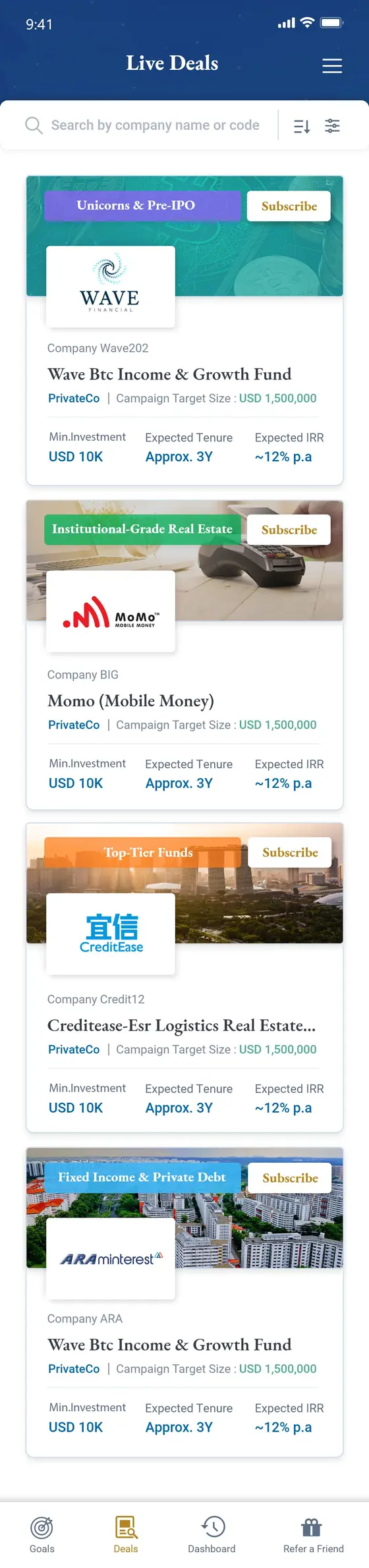
CapBridge Live Deals screen: a searchable list of private-market opportunities, each card showing the company, campaign target size, minimum investment, expected tenure and expected IRR.

About the Project

CapBridge enables investors and wealth managers to discover, evaluate, and access private-market investment opportunities through a user-friendly digital platform.

When I joined the project, the existing mobile application had been designed by a third-party company. Stakeholder discussions and an initial product review revealed several usability, consistency, and navigation issues. My responsibility was to evaluate the experience and redesign the application without losing its established brand identity.

RoleUX/UI Designer
ResponsibilitiesUser research, heuristic evaluation, wireframing, UI design, prototyping, style guide creation, and developer handoff
ToolsAdobe XD, Adobe Photoshop, Adobe Illustrator
Team1 UX/UI Designer, 2 Developers, 1 Tester
TimelineNovember 2021–May 2022
Redesign duration6+ weeks
Discovery and research: 2+ weeks
Design and validation: 4 weeks

Redesigned Mobile Experience

A more consistent and streamlined experience designed to help investors explore opportunities, review essential information, and complete important actions with fewer unnecessary steps.

Each card shows the top of a screen — open one to see it end to end.

Live Deals
Bond detail and order book
Trade Bonds
My Wallet
My Goals
Investor verification: profile
Investor verification: source of funds
Investor verification: liveness test
One more screen to come
Add the ninth screen

Challenge and approach

The Challenge

The existing application contained usability and interface inconsistencies across several important user journeys. Navigation was not always clear, visual patterns varied between screens, and some tasks required more steps than necessary.

The redesign also needed to preserve the familiar CapBridge visual identity while making the experience feel more modern, approachable, and reliable.

The Approach

I began with a heuristic evaluation based on Jakob Nielsen’s 10 usability heuristics. This helped identify and prioritise usability issues before moving into redesign.

The findings became the foundation for improving navigation, simplifying key journeys, modernising the interface, and creating a reusable style guide for future product development.

01 · Research

Identifying the Usability Issues

After discussing the product with the stakeholders and project manager, I reviewed each screen and key journey in the existing mobile application.

I evaluated the experience using Jakob Nielsen’s 10 usability heuristics, documenting issues related to navigation, consistency, system feedback, error prevention, readability, and user control.

The findings were then reviewed with the project team and prioritised according to their impact—from minor usability concerns to critical problems that could prevent users from completing important actions.

Inconsistent interface patterns

The same kind of element behaved and looked different from one screen to the next.

Unclear navigation and user feedback

It was not always obvious where a journey would lead, or what the system had just done.

Unnecessary steps in key journeys

Important tasks asked for more from the investor than they needed to.

Limited design guidance for future features

Nothing documented the rules, so every new screen risked drifting further.

02 · Design

Redesigning the Core Experience

Using the evaluation findings and stakeholder requirements, I redesigned the application while retaining its existing colour palette and overall brand familiarity.

I simplified navigation, reduced unnecessary steps, and improved the visual hierarchy across onboarding and investment-related journeys. Consistent spacing, typography, cards, modals, and interaction patterns helped create a more unified and approachable experience.

The designs were refined through multiple stakeholder reviews. When additional requirements emerged, I evaluated their importance, discussed their impact on the project scope, and incorporated the changes that supported the product’s main goals.

Building a Consistent Design Foundation

Alongside the redesign, I created a practical style guide containing the core visual rules, reusable components, and interface patterns used throughout the application.

This gave designers and developers a shared reference for maintaining consistency when improving existing screens or introducing new features.

Colours
Typography
Typography
Buttons
Form elements
Cards and interface componentsBoard still to come
Interface components
03 · Developer handoff

Preparing the Designs for Development

Once the screens and style guide were approved, I prepared the final designs for developer handoff.

I organised the design files, defined component states, and added annotations explaining navigation, interactions, and expected behaviours. I also worked closely with the developers and tester to clarify design decisions and help ensure that the implemented experience remained aligned with the approved designs.

The complete application, screen by screen, as it went to the developers — tap to look closer.

Outcome and Learnings

The project delivered a more cohesive and user-friendly mobile experience while preserving the visual identity familiar to existing users.

The heuristic evaluation gave the team a clear foundation for prioritising design improvements, while the new style guide supported greater consistency across future screens and features.

This project also reinforced the importance of balancing user needs, stakeholder expectations, technical feasibility, and changing project requirements throughout a redesign.

More consistent user journeys

The same patterns behave the same way wherever an investor meets them.

A clearer and more modern interface

Stronger hierarchy and calmer spacing, without losing the brand investors already knew.

A reusable design foundation

A style guide the team could build the next feature against.

Explore the Complete Design

View the complete high-fidelity application screens and explore the redesigned CapBridge mobile experience.

All Work Case Study — Development

Bloom

A calm, conversion-focused storefront for a clean-beauty skincare line.

Role
Product Designer & Front-End Developer
Timeline
8 weeks
Tools
Figma, Shopify, React
Platform
eCommerce Web
The Challenge

A beautiful product line, undercut by a cluttered store.

Bloom's formulas were minimal and ingredient-led, but their storefront was anything but — stacked banners, competing promotions, and a product page that buried the ingredient list under upsells. Customers who cared about what was actually in the bottle couldn't find that information without digging. The redesign needed to sell through restraint, not louder marketing.

The Process

How the project came together.

01
Research & Competitive Audit
Studied clean-beauty shoppers' decision process and audited competitors who were winning on trust, not just design.
02
UX Flows
Simplified the path from discovery to checkout and rebuilt the product page around ingredients and routine-building.
03
Visual Design System
Set a quiet, editorial visual language — soft neutrals, generous whitespace, and typography that let the product photography lead.
04
Front-End Build
Built the storefront components in React on top of Shopify, keeping performance and accessibility in scope from the start.
05
QA & Launch
Cross-browser and device testing, then a phased launch with analytics in place to track the impact.
The Solution

Selected screens from the final design.

A closer look at how the system came together across the core flows.


The Outcome

What changed after launch.

+37%
Add-to-cart rate
−22%
Cart abandonment
2×
Mobile conversion rate
Next Case Study
Studio Craft →
All Work Case Study — Branding

Studio Craft

A bold identity system for a design-and-build studio that doesn't play it safe.

Role
Brand Designer
Timeline
5 weeks
Tools
Illustrator, Figma, After Effects
Platform
Brand System
The Challenge

A studio with sharp work and a generic name badge.

Studio Craft's portfolio was full of confident, unconventional work for ambitious clients — but their own brand didn't reflect that appetite for risk. The old identity was a safe wordmark with no real system behind it, which made every new pitch deck and site update start from scratch. They needed a brand as considered as the work they were pitching with it.

The Process

How the project came together.

01
Positioning Workshop
Worked with the founders to pin down what made their process different, and turned that into a point of view the brand could stand on.
02
Identity Concepts
Explored several directions in parallel before narrowing in on a bold, structural mark that could flex across formats.
03
System Design
Built out the full palette, type system, and a flexible grid that could hold anything from a pitch deck to signage.
04
Motion & Digital Application
Designed a small set of motion principles so the identity felt alive on the website and in presentations.
05
Brand Toolkit
Packaged everything into templates the team could self-serve for future pitches and case studies.
The Solution

Selected screens from the final design.

A closer look at how the system came together across the core flows.


The Outcome

What changed after launch.

3
New client pitches won with the new deck
+45%
Portfolio site engagement
20+
Touchpoints delivered in the system
Next Case Study
Mother Tongue AI →